Your workflow is unique 👨💻 - tell us how you use Dropbox here.
Forum Discussion

bhargav_raj
2 years agoExplorer | Level 4
Dropbox chooser integrated with a react webapp not working when opened in chrome ios mobile, ipads
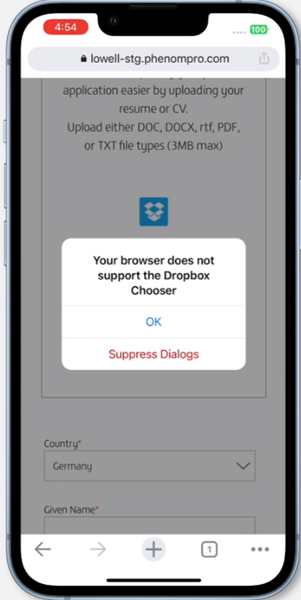
Dropbox chooser is integrated with react web application. Its working fine when opened on desktop and android devices. But its not working when application is opened in chrome browser in ios device(m...
 2 years ago
I was able to reproduce the error on my device, so given that the Chooser page works on your device, it does appear to be something with how the website is set up.
Could some other script you have loaded be interfering with how the Chooser determines if it is running on supported browsers? You might try removing in particular anything that affects the `navigator.userAgent` value or is related to mobile. Or you could try removing libraries in development until you find the culprit.
Scott-DB Dropbox Staff
2 years agoDropbox StaffHi,
I was not able to reproduce this issue on an iPad testing device. I navigated to the Chooser page and clicked the chooser button on Chrome on iOS and it was able to open.
Can you share:
- The version of iOS you are running,
- The version of the Chrome Browser you are running, and
- Whether you are seeing this issue on the Chooser page as well.
Thank you,
Scott

bhargav_raj
2 years agoExplorer | Level 4
Please try opening the below url in any ios device
mysite
I have tested in many ios devices. Please test it on iPhone 14 (v16) , chrome (92.0.4515.90).
When i tried to open the chooser page on the same device it worked fine.
Am i missing some configuration or please let me know what can i do about this.
Thank you
- Scott-DB2 years ago
I was able to reproduce the error on my device, so given that the Chooser page works on your device, it does appear to be something with how the website is set up.
Could some other script you have loaded be interfering with how the Chooser determines if it is running on supported browsers? You might try removing in particular anything that affects the `navigator.userAgent` value or is related to mobile. Or you could try removing libraries in development until you find the culprit.
- bhargav_raj2 years agoExplorer | Level 4
Thank you Scott-DB for the quick solution. The issue is due to multiple dropbox scripts getting loaded. Issue is now fixed.
About Dropbox API Support and Feedback

Get help with the Dropbox API from fellow developers and experts.
The Dropbox Community team is active from Monday to Friday. We try to respond to you as soon as we can, usually within 2 hours.
If you need more help you can view your support options (expected response time for an email or ticket is 24 hours), or contact us on X, Facebook or Instagram.
For more info on available support options for your Dropbox plan, see this article.
If you found the answer to your question in this Community thread, please 'like' the post to say thanks and to let us know it was useful!


