Your workflow is unique 👨💻 - tell us how you use Dropbox here.
Forum Discussion

ShiminCai
3 years agoHelpful | Level 6
File Upload Limit
Hi there,
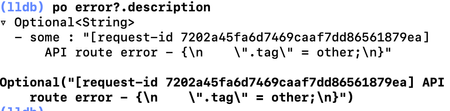
In our iOS app we are uploading files to our Dropbox with this Swift method:
func upload(_ destinationPath: String, fileUrl: URL, completion: @escaping (Bool) -> Void) {
...
- 3 years ago
Hi ShiminCai,
There isn't file size limit (there is actually but it's big enough, so doesn't matter), but it's a single transaction limit - not guaranteed more than 150MB. As can be seen in your code you are using single transaction upload only. Is it so, or just something is missing in your post. In such a case you are setting implicit limitation from transaction size to the file size! You can use upload sessions for bigger files, so to spread upload to multiple transactions (every one smaller than 150MB). 😉
Hope this helps.


Greg-DB Dropbox Community Moderator
3 years agoDropbox Community ModeratorShiminCai Yes, as Здравко mentioned, the upload method only officially supports uploading files up to 150 MB in size. For larger files, like the "521.5 mb" file you mentioned, you will need to use "upload sessions".

About Dropbox API Support and Feedback

Get help with the Dropbox API from fellow developers and experts.
The Dropbox Community team is active from Monday to Friday. We try to respond to you as soon as we can, usually within 2 hours.
If you need more help you can view your support options (expected response time for an email or ticket is 24 hours), or contact us on X, Facebook or Instagram.
For more info on available support options for your Dropbox plan, see this article.
If you found the answer to your question in this Community thread, please 'like' the post to say thanks and to let us know it was useful!


