Your workflow is unique 👨💻 - tell us how you use Dropbox here.
Forum Discussion

redrezo11
5 years agoNew member | Level 2
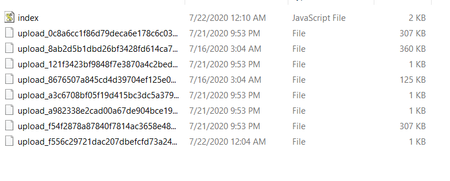
How to handle temporary files that are created by uploading files?
Sort of new to web dev in general so forgive me if I don't know what to do. The issue is that in my local project repository. Temporary files are being created. I'm not sure if this is an issue to be...

Greg-DB Dropbox Community Moderator
5 years agoDropbox Community ModeratorI'm afraid we can't be of much help with this unfortunately, as it doesn't seem these files are being produced by Dropbox code.
The Dropbox JavaScript SDK is open source, so you can see what it's doing at the following locations in the code for the 'filesUpload' method you're using, for instance:
- https://github.com/dropbox/dropbox-sdk-js/blob/f87aad93834fe3f3d78de45f15fdef1b38dc59ad/src/routes.js#L1165
- https://github.com/dropbox/dropbox-sdk-js/blob/f87aad93834fe3f3d78de45f15fdef1b38dc59ad/src/dropbox-base.js#L534
- https://github.com/dropbox/dropbox-sdk-js/blob/f87aad93834fe3f3d78de45f15fdef1b38dc59ad/src/dropbox-base.js#L585
- https://github.com/dropbox/dropbox-sdk-js/blob/f87aad93834fe3f3d78de45f15fdef1b38dc59ad/src/upload-request.js#L12
The method just uploads whatever content you supply to that 'contents' parameter.
Perhaps the files are produced by your web framework itself, for the files posted in that form to begin with? In that case, I'd recommend referring to the documentation/support for that framework.
About Dropbox API Support and Feedback

Get help with the Dropbox API from fellow developers and experts.
The Dropbox Community team is active from Monday to Friday. We try to respond to you as soon as we can, usually within 2 hours.
If you need more help you can view your support options (expected response time for an email or ticket is 24 hours), or contact us on X, Facebook or Instagram.
For more info on available support options for your Dropbox plan, see this article.
If you found the answer to your question in this Community thread, please 'like' the post to say thanks and to let us know it was useful!


