Your workflow is unique 👨💻 - tell us how you use Dropbox here.
Forum Discussion

VanessaGillier
1 year agoExplorer | Level 3
Path for API: path of the empty string
Hi,
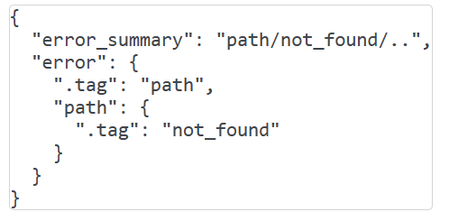
I am trying to get a list of all my file and folder names. I keep getting an error message saying:
The path is copied from my dropbox. So, I dont understand how it could not be fo...
- 1 year ago
That's an error message from pandas, not Dropbox, so I can't offer help with that. You may want to refer to the documentation or support resources for pandas.

VanessaGillier
1 year agoExplorer | Level 3
This is my new code after removing my username. but the problem remains.
The second part of you answer also confuses me a bit, although I believe I did it.
I am very new to all of this, so dumming it down might be useful.

Greg-DB Dropbox Community Moderator
1 year agoDropbox Community ModeratorI see you've removed the first component with your name, but it looks like you've also changed the rest of it now.
Specifically, the path from your original post but without the user name component would be:
folder_path = '/Rioblanco Capital LLC'but now you have:
folder_path = '/Rioblanco Dropbox'Make sure you're using the right path values based on the current contents of your account.
Also, my other comment means that you can try the following to see the contents of whatever the root folder for the call is:
folder_path = ''If you look at the 'result' from that, it will contain metadata about the items there that you can use to build other path values as needed.
- VanessaGillier1 year agoExplorer | Level 3
The new error message i get is the following;
C:\Users\Vanessa RioBlanco\Dropbox (Personal)\PC\Desktop\LEX 2024\Path Shortening\Python> python import_dropbox2.py
An unexpected error occurred: BadInputError('beaa26a4df804ca984f4c5c31a9382e0', 'Error in call to API function "files/list_folder": This API function operates on a single Dropbox account, but the OAuth 2 access token you provided is for an entire Dropbox Business team. Since your API app key has team member file access permissions, you can operate on a team member\'s Dropbox by providing the "Dropbox-API-Select-User" HTTP header or "select_user" URL parameter to specify the exact user <https://www.dropbox.com/developers/documentation/http/teams>.')
Failed to retrieve files and folders.Could this be related to the fact I added all permission options? I did this because I kept finding on the internet it could be related to permissions.
Which ones would I need.
The dropbox is indeed a shared dropbox.
- Greg-DB1 year ago
Based on that error message, you're now using an access token with "team scopes" enabled. For the sake of simplicity and security, and so you can use the code as you've written it, I recommend getting a new access token without the team scopes enabled again. You can change the scopes and then generate a new token using the app's page on the App Console.
- VanessaGillier1 year agoExplorer | Level 3
You already have been such a help thank you.
The next problem is this;
File "C:\Users\Vanessa RioBlanco\Dropbox (Personal)\PC\Desktop\LEX 2024\Path Shortening\Python\import_dropbox2.py", line 42, in <module>
df = pd.DataFrame({'File Name': files, 'Folder Name': folders})
^^^^^^^^^^^^^^^^^^^^^^^^^^^^^^^^^^^^^^^^^^^^^^^^^^^^^^^^^^
File "C:\Users\Vanessa RioBlanco\AppData\Local\Programs\Python\Python312\Lib\site-packages\pandas\core\frame.py", line 778, in __init__
mgr = dict_to_mgr(data, index, columns, dtype=dtype, copy=copy, typ=manager)
^^^^^^^^^^^^^^^^^^^^^^^^^^^^^^^^^^^^^^^^^^^^^^^^^^^^^^^^^^^^^^^^^^^^^^
File "C:\Users\Vanessa RioBlanco\AppData\Local\Programs\Python\Python312\Lib\site-packages\pandas\core\internals\construction.py", line 503, in dict_to_mgr
return arrays_to_mgr(arrays, columns, index, dtype=dtype, typ=typ, consolidate=copy)
^^^^^^^^^^^^^^^^^^^^^^^^^^^^^^^^^^^^^^^^^^^^^^^^^^^^^^^^^^^^^^^^^^^^^^^^^^^^^
File "C:\Users\Vanessa RioBlanco\AppData\Local\Programs\Python\Python312\Lib\site-packages\pandas\core\internals\construction.py", line 114, in arrays_to_mgr
index = _extract_index(arrays)
^^^^^^^^^^^^^^^^^^^^^^
File "C:\Users\Vanessa RioBlanco\AppData\Local\Programs\Python\Python312\Lib\site-packages\pandas\core\internals\construction.py", line 677, in _extract_index
raise ValueError("All arrays must be of the same length")
ValueError: All arrays must be of the same length
About Dropbox API Support and Feedback

Get help with the Dropbox API from fellow developers and experts.
The Dropbox Community team is active from Monday to Friday. We try to respond to you as soon as we can, usually within 2 hours.
If you need more help you can view your support options (expected response time for an email or ticket is 24 hours), or contact us on X, Facebook or Instagram.
For more info on available support options for your Dropbox plan, see this article.
If you found the answer to your question in this Community thread, please 'like' the post to say thanks and to let us know it was useful!


