Need to see if your shared folder is taking up space on your dropbox 👨💻? Find out how to check here.
Forum Discussion
OperationsDreaming
4 years agoNew member | Level 2
Unable to get long lived access tokens.
Hello there!
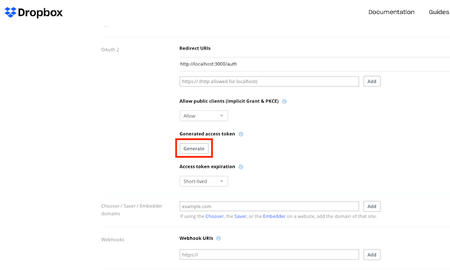
I'm trying to get an access token that doesn't expire. A long-lived access token. For now, when I generated an access token from the App Console, the session will expire after x ho...
- 4 years ago
Take a look on https://www.dropboxforum.com/t5/Discuss-Dropbox-Developer-API/Need-Permanant-Access-token-for-drop-box/td-p/583956 😉
In short - there is no more long lived access token and you should add refresh token in your code.
Hope this helps.
Greg-DB
Dropbox Community Moderator
4 years agomarksmithhfx Is that the exact code you're running? It looks correct, and it does work for me when I plug in my values. There may be something about how your client is formatting the request causing it to fail. Perhaps you can share the actual request/response you're getting (just redacting the sensitive values) so I can take a look.
marksmithhfx
4 years agoExplorer | Level 4
"Is that the exact code you're running?"
No, not exactly. I am using an OAuth2 package in the application development environment (it's like a fancy Visual BASIC) I am using. To get the refresh_token I was using this code (with redactions):
constant kAuthURL = "https://www.dropbox.com/oauth2/authorize"
constant kTokenURL = "https://api.dropboxapi.com/oauth2/token"
constant kClientID = "redacted" -- client here means this application, not this user
constant kClientSecret = "redacted" -- secret here is for this application, not this user
constant kScopes = ""
constant kPort = "54303"
since there is no parameter for token_access_type that is handled with:
put "offline" into tParams["token_access_type"]
then the call to OAuth2 itself...
OAuth2 kAuthURL, kTokenURL, kClientID, kClientSecret, kScopes, kPort, tParams
which successfully returned the array (actually JSON dictionary converted to array) I posted earlier.
This is the extent of the API I have, so I was trying to model the next step by writing:
put "refresh_token" into tParams["grant_type"]
put RefreshToken into tParams["refresh_token"] -- a var that contains the refresh token returned in the first step
-- I tested that both of these array values were properly formatted
and then calling:
OAuth2 kTokenURL, kClientID, kClientSecret, tParams
But all I get is a 404 Page not found error. I was hoping to get something more useful back (maybe you could think of a way I can do that?) so I could start to debug this, but all I get is the 404.
PS I did notice in the documentation that "authorization" is listed as a GET method and "token" as a POST method, but since I am not conversant in HTML that didn't mean anything to me. However, that might be the root cause of the problem. The application API might be formatting both as GET statements instead of the required POST one. (I should probably lookup GET and POST). Thanks
- Greg-DB4 years ago
Dropbox Community Moderator
marksmithhfx Thanks for following up with the additional information. The "GET" and "POST" are referring to the HTTP "method" for the HTTP request. Every HTTP request uses one of a number of methods, for various different use cases, with GET and POST being two of the most commonly used ones.
The Dropbox /oauth2/token endpoint in particular does require the use of the POST method. Using GET could cause the issue you're seeing.
Unfortunately I can't offer support for the "OAuth2" package you're using itself, as that's not made by Dropbox. You may need to refer to its documentation for information on configuring and debugging it. For instance, there may be a way to enable more verbose debugging output. Likewise, check how you might configure the appropriate HTTP method to use to make sure it uses POST for the request to /oauth2/token.
- marksmithhfx4 years agoExplorer | Level 4
Thanks Greg, you have confirmed what I was suspecting. In order to covert the refresh token to a new sl.access token a new kind of method needs to be used (POST) which does not appear to be supported in the current version of the OAuth2 package I am using. I will prepare something to pass along to LiveCode so they can update their OAuth2 (if they want). Using sl.access tokens that require frequent re-authorization is not ideal, but given no other alternative, I'll hobble along for awhile and see what develops down the road.
Cheers and thanks.
Mark
- marksmithhfx4 years agoExplorer | Level 4
Thanks Greg,
You know, I was thinking, what a shame Dropbox did not implement the refresh exchange process using the GET method. I am sure, since I have the ability to add additional parameters, that I could define a grant_type = "refresh_token" and a refresh_token parameter that contains the refresh token, and send that with the existing ClientKey and ClientSecret and get the result back on the same URI and all would be great.
Do you know why Dropbox chose POST over GET in this case?
PS you mentioned to check their documentation, but all it includes is the following:
Summary
Present an authorization dialog for any web service that supports OAuth2 Authorization Code Flow
pAuthURL - The URL to present for the authorization page. This can be obtained from the API documentation of the service being authorized.
pTokenURL - The URL to obtain the authorization token from once an authorization code is sent to the redirect uri. This can be obtained from the API documentation of the service being authorized.
pClientID - The application client ID obtained when setting up your application with the web service.
pClientSecret - The application client secret obtained when setting up your application with the web service.
pScopes - A comma delimited list of authorization scopes. Valid scopes will be found in the API documentation of the service being authorized. If empty the scope parameter will be omitted.
pPort - The port to use for the redirect uri. It is recommended to use the range 49152-65535.
pParams - An array of additional key -> value pairs of extra parameters to be sent to the authorization url. Some services implement additional options that require extra parameters.
Examples
constant kAuthURL = "https://slack.com/oauth/authorize"
constant kTokenURL = "https://slack.com/api/oauth.access"
constant kClientID = "XXXXXXXXX.XXXXXXXX"
constant kClientSecret = "XXXXXXXXXXXXXXXXXXXXX"
constant kScopes = "incoming-webhook"
OAuth2 kAuthURL, kTokenURL, kClientID, kClientSecret, kScopes, 54303
--- end
By tagging on an extra parameter (token_access_type = "offline") I was able to obtain a refresh token, but can't do anything with it. Unfortunately no mention of GET or POST.
Mark
- Greg-DB4 years ago
Dropbox Community Moderator
marksmithhfx It looks like the use of POST for these requests is required in the OAuth 2 specification:
The client MUST use the HTTP "POST" method when making access token requests.
I'll send this along as a feature request to support GET as well, but I can't promise if or when that might be implemented (especially as it would be contrary to the specification).
- marksmithhfx4 years agoExplorer | Level 4
Thanks Greg, but I would nix that. After looking at your post and the documentation again I realized that the LiveCode commands:
put "offline" into tParams["token_access_type"]
OAuth2 kAuthURL, kTokenURL, kClientID, kClientSecret, kScopes, kPort, tParams
must be doing both a GET and a POST (the GET for authorization, and the POST for the access token) because, per the documentation:
/oauth2/token
METHOD POST
This endpoint returns a JSON-encoded dictionary including fields below:
access_token String The access token to be used to call the Dropbox API.expires_in String The length of time in seconds that the access token will be valid for.token_type String Will always be bearer.scope String The permission set applied to the token.account_id String An API v2 account ID if this OAuth2 flow is user-linked.team_id String An API v2 team ID if this OAuth 2 flow is team-linked.refresh_token String If the token_access_type was set to offline when calling /oauth2/authorize, then response will include a refresh token. This refresh token is long-lived and won't expire automatically. It can be stored and re-used multiple times.Which is exactly what I am getting from the OAuth2 command above. So it is my misunderstanding when I said it was not using POST. It's using both. Only problem is, it was written before the age of refresh_tokens so it doesn't know what to do with them.
I'll just leave it to the experts to sort out and hope it doesn't take too long.
Thanks again,
Mark
- marksmithhfx4 years agoExplorer | Level 4
Hi Greg, the response came, and quicker than I was expecting. Also very DIFFERENT than I expected. We had previously been discussing the recommendation in the DB documentation:
curl https://api.dropbox.com/oauth2/token \
-d grant_type=refresh_token \
-d refresh_token=<REFRESH_TOKEN> \
-u <APP_KEY>:<APP_SECRET>But the result I got back from Livecode, which works perfectly, looks like this:
-- given a refresh token in var tRefreshToken...
set the httpHeaders to "Content-type: application/x-www-form-urlencoded" & \
return & "Authorization: Basic " & base64encode(kClientID & ":" & kClientSecret)
put "grant_type=refresh_token" & "&" & "refresh_token=" & tRefreshToken into tPost
put "https://api.dropbox.com/oauth2/token" into tUrl
post tPost to url tUrl
put JSONToArray(it) into tAuth
put tAuth[access_token] into tAccessToken
Naw, I would have never figured that out. But it works. And I am grateful.
Thanks for your previous attempts at resolving this.
Mark
About Dropbox API Support & Feedback
Find help with the Dropbox API from other developers.
The Dropbox Community team is active from Monday to Friday. We try to respond to you as soon as we can, usually within 2 hours.
If you need more help you can view your support options (expected response time for an email or ticket is 24 hours), or contact us on X, Facebook or Instagram.
For more info on available support options for your Dropbox plan, see this article.
If you found the answer to your question in this Community thread, please 'like' the post to say thanks and to let us know it was useful!
