Your workflow is unique 👨💻 - tell us how you use Dropbox here.
Forum Discussion

amei
7 months agoExplorer | Level 3
Using javascript to upload file to Dropbox
I am developing an html file for our group to do weekly picks online. I have to program working where the users can pick their own games. However I need a place to store and retrieve the information ...

amei
7 months agoExplorer | Level 3
Hello DB-Des
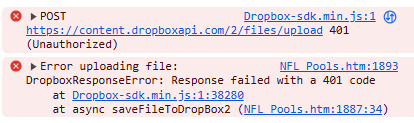
Thanks for you response. I had included a screenshot as well as my function that uploads to dropbox in my initial post. I will provide them again, and try to include more detail. In my html console this is the error message I receive (screenshot below) :
I have a function that is utilized once the user has made selections on all games and clicks the Save button. This begins the upload attempt to my dropbox app. See details of my dropbox app in my initial post. I wanted to include this in case there was an issue with how I setup my dropbox api.
Here is my function that I use to attempt to upload an array (contains information on user picks) to dropbox. Note I left out the actual access token code. All I currently use for authentication is the API access Token. I am not sure how to properly authenticated users to upload to dropbox.
async function saveFileToDropBox() {
const dbx = new Dropbox.Dropbox({ accessToken: '' " });
var text_array = JSON.stringify(users_array)
var file = new File([text_array], "users_array.json", { type: "application/json" });
var dropbox_path_file = '/2025/users_array.json';
try {
const response = await dbx.filesUpload({
path: dropbox_path_file, // Desired path and filename in Dropbox
contents : file ,
mode: { '.tag': 'overwrite' } // Optional: Overwrite if file exists
});
console.log('File uploaded successfully:', response);
} catch (error) {
console.error('Error uploading file:', error);
}
}
Hopefully this along with screenshots of my app settings provides enough information. I tried clicking on the error to get more information about it :
Only first part of access token

DB-Des Dropbox Community Moderator
7 months agoDropbox Community ModeratorErrors from the API are typically accompanied by a message that gives more context about what went wrong. We’ll need to see that message in order to better assist you.
In your code's 'try...catch' block, you are logging the error to your console:
...
    catch (error) {
        console.error('Error uploading file:', error);
    }
...
Looking at your console should provide you more insight into the error you are receiving. One of the properties will be the 'error_summary'.
To further narrow it down, you can console 'error.error' or 'error.error.error_summary'.
- amei7 months agoExplorer | Level 3
I tried your suggestion about error.error in the console. The 1st error description was an expired access token which I refreshed. The 2nd error description was to enable files.content.write, which I enabled. The 3rd error description (latest), shown below :
The following are my app permissions :
- DB-Des7 months ago
If the 'files.content.write' scope was enabled after the access token was generated, you’ll need to generate a new access token. Permission changes don’t apply retroactively to previously issued tokens.
- amei7 months agoExplorer | Level 3
When I updated my access token I received the message below :
But when I looked in the dropbox folder in the app I did not see the file there., however it does appear in recents. Mabye there is a delay as I do see it in the folder a little later. I also notice that my access token expires after a day and I have to keep generating a new one. Is there a way to make it last longer (e.g. one month) ?
About Discuss Dropbox Developer and API

Explore Dropbox Developer & API discussions with developers like you.
The Dropbox Community team is active from Monday to Friday. We try to respond to you as soon as we can, usually within 2 hours.
If you need more help you can view your support options (expected response time for an email or ticket is 24 hours), or contact us on X, Facebook or Instagram.
For more info on available support options for your Dropbox plan, see this article.
If you found the answer to your question in this Community thread, please 'like' the post to say thanks and to let us know it was useful!


