We’re Still Here to Help (Even Over the Holidays!) - find out more here.
Forum Discussion

anthonybme
6 years agoHelpful | Level 5
Files & Folders not-unlockable. Can't Delete. Not in the web view of my account.
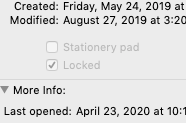
I have a folder full of folders and files on my Mac in my Dropbox that are all locked, but when I Get Info on them, the "unlock" is greyed out. I can't unlock them, and so I can't delete them from my...
 6 years ago
I solved it the brute force way- Terminal.
Which doesn't fix the underlying Dropbox issue.Last login: Fri Apr 17 21:58:36 on console
Mac-mini:~ --$ sudo rm -r /Users/--/Dropbox/Music
Password:
override rw-r--r-- 502/staff uchg for /Users/--/Dropbox/Music
I post this as to be a help to others faced with the same issue that isn't solved with the Dropbox FAQ.
anthonybme
6 years agoHelpful | Level 5
I cannot unlock the items in my Dropbox folder to delete them.
Lusil wrote:
> You can try quitting the app, and following the steps I mentioned in my previous thread again.
The steps you mentioned in your previous thread, say:
> On your Mac, select an item, then choose File > Get Info.
> Click the lock icon to unlock it.
I cannot unlock the items in my Dropbox folder to delete them.
Dropbox has smehow set the ownership to something else.
The finder says "fetching" meaning it's waiitng to be told by Dropbox who owns the files.
Since I can only "read" the files on my computer that Dropbox put there
(they weren't there until I reinstalled and re-logged into my account)
I'm not able to delete them.
The the steps you mentioned in my previous thread...
all four times...
tell me to unlock the folder.
Which is exactly what Dropbox is not letting me to do.
And yes, it's aDropbox issue because until I reinstalled Dropbox, and re-logged into my old account,
Those files were not on my computer. So Dropbox put them there.
And Dropbox is assigning ownership of the files.
But not assigning ownership to me.
anthonybme
6 years agoHelpful | Level 5
I solved it the brute force way- Terminal.
Which doesn't fix the underlying Dropbox issue.
Last login: Fri Apr 17 21:58:36 on console
Mac-mini:~ --$ sudo rm -r /Users/--/Dropbox/Music
Password:
override rw-r--r-- 502/staff uchg for /Users/--/Dropbox/Music
I post this as to be a help to others faced with the same issue that isn't solved with the Dropbox FAQ.
About Delete, edit, and organize
Solve issues with deleting, editing, and organizing files and folders in your Dropbox account with support from the Dropbox Community.
The Dropbox Community team is active from Monday to Friday. We try to respond to you as soon as we can, usually within 2 hours.
If you need more help you can view your support options (expected response time for an email or ticket is 24 hours), or contact us on X, Facebook or Instagram.
For more info on available support options for your Dropbox plan, see this article.
If you found the answer to your question in this Community thread, please 'like' the post to say thanks and to let us know it was useful!


