We’re Still Here to Help (Even Over the Holidays!) - find out more here.
Forum Discussion

FlorentH
7 months agoHelpful | Level 5
I can't download a shared file via link when opening it via Facebook Messenger's browser.
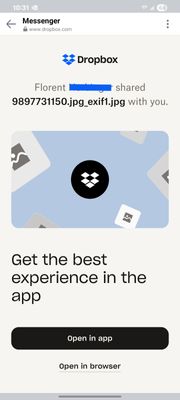
When I share a Dropbox link on Facebook Messenger, and the receiving user opens it inside of Messenger's browser on their phone, they are unable to download the file.
The user is first faced with t...

FlorentH
7 months agoHelpful | Level 5
Hi Nancy,
Thank you for your quick reply and for testing the issue on your end.
I will try sharing a few more links and connecting to different networks. However, could you please confirm with me whether you were successfully able to download a file from within Messenger's browser (and not an external browser)? What did you press when prompted with the "You're leaving our app" message?
Thank you very much for your help,
Florent

Nancy Dropbox Community Moderator
7 months agoDropbox Community ModeratorThanks for testing this out too, Florent! I really appreciate it.
That is correct; I was able to normally download the file through the default browser on Messenger, without opening a different one.
When testing this, I’m seeing the exact same options that appear on your end. However, when I tap on “Continue”, my file is then downloaded to my local device and I don’t see any errors.
If possible, can you also change the default browser on your mobile device and let me know if it makes any difference?
About View, download, and export

Need support with viewing, downloading, and exporting files and folders from your Dropbox account? Find help from the Dropbox Community.
The Dropbox Community team is active from Monday to Friday. We try to respond to you as soon as we can, usually within 2 hours.
If you need more help you can view your support options (expected response time for an email or ticket is 24 hours), or contact us on X, Facebook or Instagram.
For more info on available support options for your Dropbox plan, see this article.
If you found the answer to your question in this Community thread, please 'like' the post to say thanks and to let us know it was useful!


