We’re Still Here to Help (Even Over the Holidays!) - find out more here.
Forum Discussion

FlorentH
7 months agoHelpful | Level 5
I can't download a shared file via link when opening it via Facebook Messenger's browser.
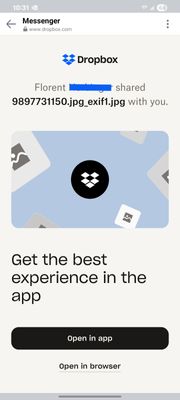
When I share a Dropbox link on Facebook Messenger, and the receiving user opens it inside of Messenger's browser on their phone, they are unable to download the file.
The user is first faced with t...

FlorentH
7 months agoHelpful | Level 5
Hi Nancy,
Do you have the Dropbox app installed on your phone? I am interested in the use case where a user presses "Continue" but does not have the app installed.
I would like a user to be able to download a file from Messenger on their phone without having to install the Dropbox app.
Thank you,
Florent
- Nancy7 months ago
Dropbox Community Moderator
Hey Florent! When I tested this the first time, I also had the Dropbox mobile app installed on my phone.
To isolate the issue more though, I just uninstalled the Dropbox app completely, but I was still able to download the file normally. In any case, the Dropbox app isn't necessary when it comes to downloading files via shared link.
Can you temporarily change the default browser on your mobile device, and let me know what happens then?
- FlorentH7 months agoHelpful | Level 5
I tried changing my default browser from Firefox to Chrome, but I get the same 403 error when I click "Continue" on my Android phone.
But just as a reminder, the issue I'm having is downloading a file from within Messenger's browser, not an external browser.
- Jay7 months ago
HI FlorentH, thanks for the information. In order to look into this matter in more detail, I'd recommend contacting the support team directly for them to investigate further.


About View, download, and export

Need support with viewing, downloading, and exporting files and folders from your Dropbox account? Find help from the Dropbox Community.
The Dropbox Community team is active from Monday to Friday. We try to respond to you as soon as we can, usually within 2 hours.
If you need more help you can view your support options (expected response time for an email or ticket is 24 hours), or contact us on X, Facebook or Instagram.
For more info on available support options for your Dropbox plan, see this article.
If you found the answer to your question in this Community thread, please 'like' the post to say thanks and to let us know it was useful!


