We’re Still Here to Help (Even Over the Holidays!) - find out more here.
Forum Discussion

robbsalzmann
8 years agoNew member | Level 2
Selective Sync is syncing files that are not selected.
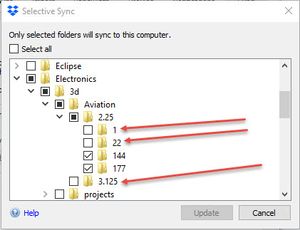
I installed Dropbox on a laptop. Dropbox is configured to Selective Sync, two fairly specific folders. However it is downloading everything around that folder starting 2 folders up. The sync shoul...
- 8 years agoMy query was just to see if they had the gray icon, that’s all.
Could you check if you’re running a beta version of the Dropbox desktop application. You can do this by hovering your mouse over the Dropbox icon in the system tray or menu bar.
It should say something like 41.4. If it says 42.3, then you’re running the beta. Please follow the next steps to downgrade to the stable build:
1. Visit https://www.dropbox.com/account
2. Scroll down to the section titled "Preferences" and uncheck the box next to "Early releases" if it is checked.
Then, use the following link to install the latest stable version of the Dropbox desktop application:
https://www.dropbox.com/download
Let us know how it goes!

Jay Dropbox Community Moderator
8 years agoDropbox Community ModeratorThere shouldn’t be any brown arrows… The only icons we have on files and folders are as follows:
Synced (and in terms of Smart Sync, locally stored) Sync in progress A file or folder isn't syncing due to Selective Sync Sync not happening Smart Sync - Online-only content Smart Sync - Folders with both online-only and local files in it
Which ones are you seeing on the files/folders?

gwilson1120
8 years agoExplorer | Level 3
There must have been a selective sync conflict, so I took the folders which were unchecked and moved them off of my laptop to a flash drive. I then tried checking and unchecking a couple of those on DROPBOX.com and it seems to be fine now.
 robbsalzmann8 years agoNew member | Level 2"Selective sync conflict"? is that a thing? Where is it documented?
If this were 2 or 3 folders I could see doing what you did. However, there are literally thousands of files being downloaded that are not selected in Selective Sync.- Rich8 years ago
Super User II
robbsalzmann wrote:
"Selective sync conflict"? is that a thing? Where is it documented?Yes.
- Jay8 years agoMy query was just to see if they had the gray icon, that’s all.
Could you check if you’re running a beta version of the Dropbox desktop application. You can do this by hovering your mouse over the Dropbox icon in the system tray or menu bar.
It should say something like 41.4. If it says 42.3, then you’re running the beta. Please follow the next steps to downgrade to the stable build:
1. Visit https://www.dropbox.com/account
2. Scroll down to the section titled "Preferences" and uncheck the box next to "Early releases" if it is checked.
Then, use the following link to install the latest stable version of the Dropbox desktop application:
https://www.dropbox.com/download
Let us know how it goes!

About View, download, and export

Need support with viewing, downloading, and exporting files and folders from your Dropbox account? Find help from the Dropbox Community.
The Dropbox Community team is active from Monday to Friday. We try to respond to you as soon as we can, usually within 2 hours.
If you need more help you can view your support options (expected response time for an email or ticket is 24 hours), or contact us on X, Facebook or Instagram.
For more info on available support options for your Dropbox plan, see this article.
If you found the answer to your question in this Community thread, please 'like' the post to say thanks and to let us know it was useful!


