Your workflow is unique 👨💻 - tell us how you use Dropbox here.
Forum Discussion

Niki74
2 years agoExplorer | Level 3
Automatically move files based on file name possible?
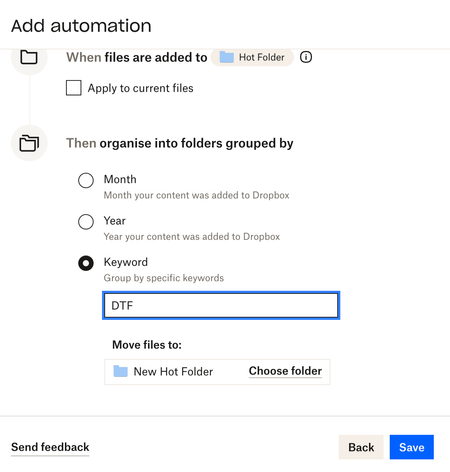
Hi there, I have a folder on Dropbox that receives files throughout the day. I would like to automatically move files that contain DTF in their file name, from this folder to another in Dropb...

Hannah Dropbox Community Moderator
2 years agoDropbox Community ModeratorHey Niki74, thanks for joining our Community!
Can you give us a bit more info as to why the automation is not working?
Are you getting some kind of error message?
Is the organization by keyword the only one that's not working? Have you tried other options?
Let me know what you find.

Niki74
2 years agoExplorer | Level 3
Hi Hannah,
I need to move files based on part of the file name, and the automation only seems to work based on a keyword.
Unless I can find a way to automatically assign a keyword based on part of a file name I'm pretty sure it's not possible.
- Jay2 years ago
Hi Niki74, is the keyword you're entering part of the filename?
- Niki742 years agoExplorer | Level 3
Yes it is, I posted a screenshot of what I was trying to do in the first post.
I just want to automatically move any files that have DTF as part of the file name into another folder if possible.


About Delete, Edit, and Organize
Solve issues with deleting, editing, and organizing files and folders in your Dropbox account.
The Dropbox Community team is active from Monday to Friday. We try to respond to you as soon as we can, usually within 2 hours.
If you need more help you can view your support options (expected response time for an email or ticket is 24 hours), or contact us on X, Facebook or Instagram.
For more info on available support options for your Dropbox plan, see this article.
If you found the answer to your question in this Community thread, please 'like' the post to say thanks and to let us know it was useful!


