Your workflow is unique 👨💻 - tell us how you use Dropbox here.
Forum Discussion

sclippy
2 years agoExplorer | Level 3
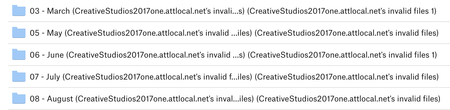
Can not Delete files with this name "one.attlocal.net's invalid files"
I have several files that I am trying to delete in my DB. When I select them and then Delete, a few seconds later, they reappear. see image below. There are 4 folders total, sometimes more, but t...

sclippy
2 years agoExplorer | Level 3
Hi again, I tried to find the version history, but there it does not show any activity.
Am I in the right place?

Jay Dropbox Community Moderator
2 years agoDropbox Community ModeratorHi sclippy, there isn't any version history for folders, but for individual files instead. Are there files in those folders? If so, you can check the version history on one of those files.
- sclippy2 years agoExplorer | Level 3
These are not folders even though they look like it. nothing opens when I double click on each one.
- Hannah2 years ago
Hey sclippy, do you see these folders in the local Dropbox folder on your computer? And if so, are you able to delete them from there?
- sclippy2 years agoExplorer | Level 3
yes, they are on my DB as folders with my other folders on my desktop. Everytime I delete them, they come back. I have gone to the online DB and deleted from there, but they still come back.

About Delete, Edit, and Organize
Solve issues with deleting, editing, and organizing files and folders in your Dropbox account.
The Dropbox Community team is active from Monday to Friday. We try to respond to you as soon as we can, usually within 2 hours.
If you need more help you can view your support options (expected response time for an email or ticket is 24 hours), or contact us on X, Facebook or Instagram.
For more info on available support options for your Dropbox plan, see this article.
If you found the answer to your question in this Community thread, please 'like' the post to say thanks and to let us know it was useful!


