Your workflow is unique 👨💻 - tell us how you use Dropbox here.
Forum Discussion

2ndMile
2 years agoNew member | Level 2
Duplicated Files Cannot Be Renamed - Ventura 13.4.1
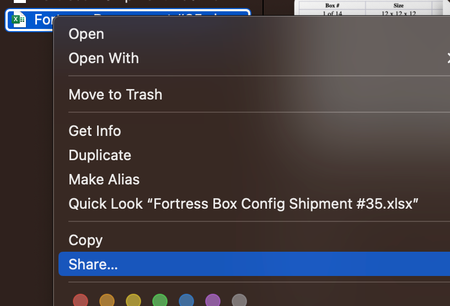
Hello, Since upgrading to Ventura I have noticed several weird bugs with DropBox. The most recent is that I can't rename a duplicated file. Pressing "Enter" gives the "error" chime. Right-cl...

Walter Dropbox Community Moderator
2 years agoDropbox Community ModeratorSure thing Laurence S.4 - thanks for flagging!

PeterAhlstrom
1 year agoNew member | Level 2
This same bug showed up on my Sonoma 14.4.1 machine only within the past two weeks. It was never a problem before. I am on the beta version v198.3.7576, and don't want to switch to the standard version since it stores the files differently. It's possible there was a regression in the beta code. I have been using the beta version since I got this computer in June 2023.
- PeterAhlstrom1 year agoNew member | Level 2
It may be relevant that this tends to happen with files that were email attachments, dragged from the macOS Mail message window straight into the specific Dropbox subfolder in the Finder. Today when I dragged a message like that, I couldn't rename it and I couldn't move it to another folder like my Downloads folder. (The cursor turned into the white 🚫 symbol.) However, when I dragged it from Mail to my Downloads folder and THEN dragged it to the Dropbox subfolder, I could afterward rename it as usual.
- PeterAhlstrom1 year agoNew member | Level 2
Using xattr -lx on a file that has the problem shows this:
com.dropbox.attrs:
00000000 0A 12 0A 10 EC E4 27 C1 B3 FC AF 80 00 00 00 00 |......'.........|
00000010 00 02 3A 35 10 86 DD F6 83 08 |..:5......|
0000001AIf I copy that file using cp -X to the same folder, I get a file that does NOT have the problem, and it has this xattr:
com.dropbox.attrs:
00000000 0A 12 0A 10 EC E4 27 C1 B3 FC AF 80 00 00 00 00 |......'.........|
00000010 00 02 3A 36 10 BC FE D3 CB 01 |..:6......|
0000001AAs you can see, the hex bytes on the second line are different.
- PeterAhlstrom1 year agoNew member | Level 2
Well, I'm trying to edit my responses, but it's not working in Safari. I choose edit from the ... menu, and then nothing happens.
Anyway, looks like I was barking up the wrong tree. I copied a file and it had the problem. Then I copied the same file via cp -X on the command line, and it did not have the program. Both files had the same filename, and both files had the exact same data in com.dropbox.attrs. Yet one had the "can't edit the filename" problem, and the other didn't.
Checking the files via mdls, everything is the same except a couple lines. The file with no problem has "kMDItemIsUploading = 0" and the file with the problem is lacking that line.
Also, the no-problem file has these dates as today:
kMDItemContentCreationDate
kMDItemContentCreationDate_Ranking
kMDItemDateAdded
kMDItemFSCreationDate
kMDItemInterestingDate_Ranking
And it has these dates as the date of the original file it was copied from:
kMDItemContentModificationDate
kMDItemFSContentChangeDate
On the other hand, the file with the problem has these dates as today:
kMDItemContentCreationDate_Ranking
kMDItemDateAdded
And these dates as the date of the original file it was copied from:
kMDItemContentCreationDate
kMDItemContentModificationDate
kMDItemFSContentChangeDate
kMDItemFSCreationDate
kMDItemInterestingDate_Ranking
Other than those things, everything in mdls is the same.
About Delete, Edit, and Organize
Solve issues with deleting, editing, and organizing files and folders in your Dropbox account.
The Dropbox Community team is active from Monday to Friday. We try to respond to you as soon as we can, usually within 2 hours.
If you need more help you can view your support options (expected response time for an email or ticket is 24 hours), or contact us on X, Facebook or Instagram.
For more info on available support options for your Dropbox plan, see this article.
If you found the answer to your question in this Community thread, please 'like' the post to say thanks and to let us know it was useful!


