Our Community is in read-only mode until April 8th, learn more here. You can still search existing threads or get help via Dropbox Support, the Dropbox Help Center, or Learn.
edit
255 Topics
I download my PDFs for offline use on my iPad, but it corrupts them and I can't edit them.
Hi everyone. I use dropbox primarily through the files folder on my iPad and computer, where I annotate PDFs of textbooks for law school. I have been doing this for a year and it's worked pretty well. Recently, however, I have two problems: (1) Even if I download offline the pdf to my files folder, at some point if I am editing offline, it will try to sync and fail and undownload, leaving me unable to edit the file. (2) In the last week, I have annotated PDFs and saved them. Then they become corrupted and won't open. I then have to restore an earlier version of the PDF, which doesn't have the latest annotation, which is super annoying to lose all of my work. Any ideas or advice on either issue?73Views0likes5Comments
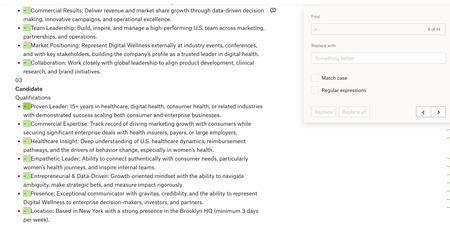
Paper: Find + Replace (with blanks) doesn't work
Device: Macbook Operating System/Browser (if using the web): macOS Tahoe 26.3.1, Chrome Dropbox App Version: Paper Question or Issue Whenever I try using Find & Replace in Dropbox Paper, I can’t seem to replace text with nothing (leave the replacement field blank) the way I can in MS Word/Google Docs. e.g. if I want to quickly remove a recurring character, extra spaces, or formatting marker across a document, Paper doesn’t let me do a blank replace, which makes cleanup much harder than it needs to be.41Views0likes1CommentMy recently edited Microsoft Excel files are suddenly missing.
Device Mac mini, Macbook air Operating System/Browser (if using the web) OSX tahoe Dropbox App Version (if using the app) not sure Question or Issue two commonly-edited (except not the past 30d) excel files are suddenly missing. They were not deleted and were present on multiple machines/devices as recently as early January. The only thing I changed was how I log in to Office 365 (changed from corporate license to university license). I haven't got it backed up in one place so am at a loss re how to recover them.150Views0likes8Comments
My main file doesn't show recent updates (last one was 7 months ago) and there's no history.
Device samsung galaxy s8 and s21 and antique win 7 laptop Operating System/Browser (if using the web) one old android one current, one old windows Question or Issue my main file suddenly is like 7 months old, 7 months lost and no history for thirty days. this is horrible that this can happen, what's the point of backup like this?226Views0likes15CommentsI can't edit my original text in PDF files, even though I'm on the Plus plan.
I finally bit the bullet to upgrade to the Plus Plan primarily for pdf editing capability. When I tried my first pdf edit, I as so disappointed to find that this plan does not allow for editing of original text! As I read the Features web page regarding pdf editing, I saw "With Dropbox plans, you can make in-line text edits that automatically match the original document's font family, size, and styling" and thought that a paid Plus plan would do the trick. Is there any intention to enhance the Plus Plan pdf editing capabilities? Not sure if I need this plan with current limitations.180Views0likes3Comments
I edited an old document today, but I can't restore it to its previous version.
Question or Issue I have been using Dropbox for many years mainly as a backup system of all my files. I thought my data was save: If I ever edit/change for example a word document and then accidentally save it over the original instead of saving it with a different name, that Dropbox would keep a copy of the original (for 30 days). Today I have exactly that problem. I used a several year old document (as a template), changed the content but instead of saving it under a new name, just pressed "Save". I can't see the original in the version history. It looks like the original is now lost, because it was "older than 30 days". That to me doesn't make any sense. Even upgrading to the 180 or 365 day version would not have helped. Is that correct? If so, I will need to drop Dropbox and find another solution. Could you please confirm? Kind Regards, RalfSolved289Views0likes5Comments
Loss of reliable “Date Modified” behavior is destroying file discovery and productivity
I need to raise a serious productivity issue that has fundamentally broken how I work in Dropbox. For years, my workflow depended on being able to sort and find files reliably by Date Modified. This is not a “nice to have” feature, it is essential for meeting deadlines. I work across many active projects and frequently need to locate the most recently edited file quickly. Since Dropbox began forcing background indexing / “modifying” files, the Date Modified field has effectively become meaningless. Files that I have not touched are suddenly marked as modified, while files I actually worked on recently are buried or out of order. What used to take seconds now takes hours. This has had very real consequences: I can no longer trust sorting by Date Modified I waste huge amounts of time opening files just to verify which version is current My ability to meet deadlines has been severely impacted My productivity has dropped dramatically To be clear: This is not user error, not a learning curve issue, and not a preference change. This is a regression in core file-management behavior. If Dropbox needs to index files internally, that process should not overwrite or redefine the user-visible “Date Modified” metadata. That breaks established OS-level workflows and makes Dropbox actively hostile to professional use. At minimum, Dropbox needs to provide one of the following: A way to preserve true file modification dates A separate, clearly labeled field for “Last Indexed” or “Dropbox Activity” Or an option to disable indexing behaviors that rewrite modified timestamps Right now, Dropbox is making it harder, not easier, to find my own work. I am genuinely questioning whether I can continue using it for professional projects if this behavior remains. I would really appreciate a response from Dropbox staff acknowledging this issue and explaining whether a fix or workaround is planned.194Views1like3Comments
Can no longer add album art to mp3s in the Dropbox folder
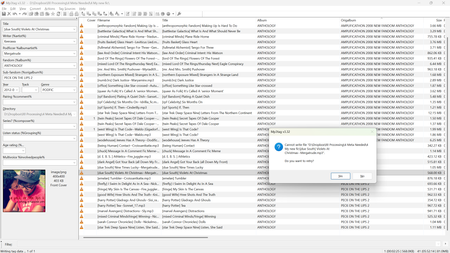
Operating System: Windows 11 Home Dropbox App Version: 239.4.8301 Question or Issue As of last night, I can no longer add album art to mp3s using the program mp3tag. I seem to be able to edit all other metadata. This seems to only be a problem if the files are in my Dropbox folder! What I've tried: Editing other metadata fields. Worked fine. Pause Dropbox, in case it was mid-sync. Nope. And sync is up to date. Make a "new" version by converting the file (open in Audacity, copy waveform into a new window, export as mp3). Nope. Computer restart, several times as I went through the processes below. Moved files out of Dropbox and tried adding art. This was successful! I put the files back in Dropbox and tried to edit again, and could not. Upgrading Dropbox to latest version. Downgraded Dropbox a few versions. Upgraded again. Made sure mp3tag was up to date. Latest version release was from November 11, 2025, so it seems unlikely to have broken due to that long-ago update. Uninstalled Dropbox. Success! I was able to edit all mp3 files, no issue. Obviously, not ideal, because I need to back things up! Reinstalled Dropbox. Failure. Can no longer add album art. Checked if other kinds of files can be edited. Can edit images and .txt documents, stopped there. Issue really seems to just by album art for mp3s. Checked if files were read-only, they are not. Folders are marked as indeterminate, but this seems to be a Windows behavior. No hidden files found. Checked security/permissions. Authenticated users, SYSTEM, and Administrators have full permissions (except "Special permissions," which I wasn't able to enable for anyone.) Plain "Users" did not have write permission, but when I enabled write permission, this did not resolve the issue. I haven't tried messaging support, yet, since hopefully someone can guess what I'm missing.211Views0likes8Comments
My files appear to be empty after editing
Hello, I'm on an ASUS Zenbook running Windows 11. I have a shared dropbox folder that constantly has files getting wiped/copied (when they get copied they are empty) showing up on the dropbox. It always shows me editing the file and its usually multiple at the exact same time. All the files have nothing in them and instead are blank. I know you can restore the file but its been happening for months and across multiple different shared folders and its honestly a headache to fix. Help appreciated, thanks in advance.283Views0likes9Comments