Our Community is in read-only mode until April 8th, learn more here. You can still search existing threads or get help via Dropbox Support, the Dropbox Help Center, or Learn.
Forum Discussion

Danyel
3 years agoExplorer | Level 3
How to remove old, non active Dropbox installation from Windows 10
Hello all!
I installed Dropbox on my Windows 10 PC many years ago. The install location was the L: drive.
Two years ago I did a fresh install of Windows 10. I had to reinstall Dropbox. This t...
 2 years ago
I got the folder deleted. First I was able to move the two sub-folders from the Dropbox folder and put them in C:\Temp. Then I could delete the Dropbx folder. That really did not solve the problems because I still could not delete the now moved sub-folders. But I was now in a simpler environment.
After much trial and error, I found this worked.
For each sub-folder, I clicked in Properties and then Security. Then I clicked on Advanced. There was a Deny permission entry for "Special" access. I highlighted that and clicked om Edit. I clicked on Show Advanced Permissions. Included in that list were checked Advanced Persmission for Delete and Delete Subfolder and Files. Eureka, might those Deny Delete special permissions that have something to do with not being able to delete those files?
I clicked on Cancel to get back to the Advanced window. I highlighted the "deny" Special access entry again. I checked "Replace all child ....". I clicked on Remove. I clicked Yes in the confirm action box that popped up. A progress window flashed by and I was back at the Properties window. The Deny Special permission was deleted. I clicked on OK. The Properties window disappeared and I right-clicked on the folder and selected delete. I was asked to confirm if I wanted to permanently delete it. I responded yes. AND IT WORKED! The folder was now deleted.

Danyel
3 years agoExplorer | Level 3
Thank you for the follow up, Nancy.
The folder owner (same owner for the 5 recalcitrant folders), shared Viewer permissions with me.
on Dropbox.com, I deleted the 5 folders from my file.
My understanding is this equals self-removing myself from the shared folders. They now sit in my Deleted Files page. When I try to Delete the folder permanently, the message says:
Permanently delete 1 item?
You no longer have access to REDACTED. You can’t make any changes to it, but you can hide it from your view. Hiding folders won’t free up space.
On the Dropbox for Windows side, these are the 5 folders that won't delete. The first message says I need Administrative permissions. Through Windows Properties >Security > Advanced, I've confirmed that I have administrative permission for OLD Dropbox, and the 5 folders inside. I suspect that this message actually refers to me not being the owner of these Dropbox folders?
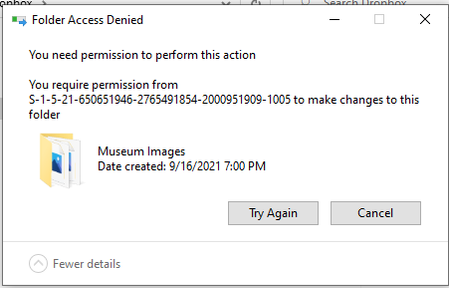
I click Continue and Windows does more work before giving a message that I require permission from [string of letters and numbers that I suspect refers to the person who owns and shared these folders with me) to make changes.
Eventually, I'll need to restore my sharing of these 5 folders but I'm hoping to remove them from this old installation of Dropbox for Windows, "OLD Dropbox" first before re-adding them to the active and syncing "Dropbox" folder on Windows.

Hannah Dropbox Community Moderator
3 years agoDropbox Community ModeratorThe thing is, Danyel, that since the old Dropbox folder is no longer linked to your Dropbox account, it's now become just a normal folder on your computer.
This has to do with Windows permissions. I have found some steps online, that may help with this situation, though.
1. Change User Account Control Settings.
2. Activate The Built-in Administrator Account (Command Prompt)
3. Use SFC Scan.
4. Use Safe Mode.
5. Change User Privilege Settings.
6. Delete a Folder via Third-party Software.
- azalea4va2 years agoHelpful | Level 6
Thanks for the help Hannah, but I wonder if we could explore this more. I have a similar problem but in a simpler configuration. I am running Win10 on a standalone personal computer. I installed dropbox to work with a work dropbox account. My responsibilities that gave me access to the account changed, so I no needed dropbox access. I uninstalled drop box. But the c:\users\ME\Dropbox folder still existed. I tried to delete it in file explorer. File Explorer said access denied and that I had to change to administrator. I clicked on Continue and did that. Then FileExplore said access denied and the operation required the permission of MY account (which is where I started). But at that point, it did not give the option to continue, just try again, which did nothing, or cancel. I tried FileExplore running as ME and running as admin, both failed. I tried command prompt. The DEL command for the Dropbox folder ran without any error message but the folder did not get deleted. Same result running as ME and admin. I tried booting in safe mode and deleting. No change in behavior.
1. Change User Account Control Settings.
I do not know what that is
2. Activate The Built-in Administrator Account (Command Prompt)Did not work
3. Use SFC Scan.No errors reported
4. Use Safe Mode.Did not work
5. Change User Privilege Settings.Not sure what you mean by this. All files in the dropbox folder are owned by my account. My account has all permission (read/write/etc.
6. Delete a Folder via Third-party Software.
I am not inclined to use third party software to "trick" Windows into doing something it does not want to do. But that may be why I am having a problem in the first place. If I have to resort to third party software, then what kind of tricky stuff did Dropbox do in setting up or managing that folder such that using regular Windows mechanisms (and extraordinary ones as well) cannot delete it? That is the headline for me. And this strikes as a non-trivial problem in what Dropbox software has done.
So I am looking for ideas of where to go from here.- Jay2 years ago
Hi azalea4va, to change the UAC, you can follow these steps to see if they help. Keep us updated with any changes.
- azalea4va2 years agoHelpful | Level 6
I think the insructions were for a different flavor of windows, maybe a server implentation? There is not "System and Security" in my Windows 10. There is a Security and Maintenance" and a "System". In the former, there is a "Change UAC settings" but those settings only dealt with notification, they did not control authroization. They were set to the default anyway, which is always notify. Tere was a change security and mainenance settings but again that nly dealth with essages and everything was already turned on.

About Delete, Edit, and Organize
Solve issues with deleting, editing, and organizing files and folders in your Dropbox account.
The Dropbox Community team is active from Monday to Friday. We try to respond to you as soon as we can, usually within 2 hours.
If you need more help you can view your support options (expected response time for an email or ticket is 24 hours), or contact us on X, Facebook or Instagram.
For more info on available support options for your Dropbox plan, see this article.
If you found the answer to your question in this Community thread, please 'like' the post to say thanks and to let us know it was useful!


