Need to see if your shared folder is taking up space on your dropbox 👨💻? Find out how to check here.
Forum Discussion

jonsymbolgoodman
3 years agoExplorer | Level 3
Mystery Photos on my account
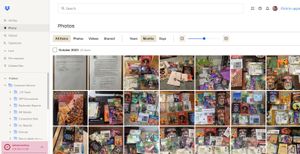
Long story short: I have to free up space and these photos are mysterious in origin -- and I don't know what to call that 'menu item' on the left edge to be able to search for it in help in order to ...

Jay Dropbox Community Moderator
3 years agoDropbox Community ModeratorHi jonsymbolgoodman, thanks for bringing this to our attention.
If you click one of the photos, does it show its location on the right hand side?
This will help me to assist further!
 jonsymbolgoodman3 years agoExplorer | Level 3
Down the righthand side, there is a space for comments...
- Walter3 years ago
Hey jonsymbolgoodman - sorry to jump in here, but could you navigate to these files and check their version history?
Also, based on your screenshot it seems that you're using a personal account on the Basic plan and those folders are normal folders stored in the account, not shared ones so I'll need you to elaborate on what you mean by '(un)following' them. Were you referring to the relevant feature perhaps?
- jonsymbolgoodman3 years agoExplorer | Level 3
So the account was created to be able to access shared files for work. I haven't linked it to anything, but was 'invited' to join the shared space. I'm the only one in the group who is getting "out of space" notifications, and am trying to figure out how to drop stuff to make space so I can actually work... These are not photos I uploaded, so they came from *somewhere* right?
If I'm the only one whose storage is full, there must be something I'm linked into which no one else is, and this bunch of photos seemed to be the most likely culprit...

About Delete, edit, and organize
Solve issues with deleting, editing, and organizing files and folders in your Dropbox account with support from the Dropbox Community.
The Dropbox Community team is active from Monday to Friday. We try to respond to you as soon as we can, usually within 2 hours.
If you need more help you can view your support options (expected response time for an email or ticket is 24 hours), or contact us on X, Facebook or Instagram.
For more info on available support options for your Dropbox plan, see this article.
If you found the answer to your question in this Community thread, please 'like' the post to say thanks and to let us know it was useful!


