Need to see if your shared folder is taking up space on your dropbox 👨💻? Find out how to check here.
Forum Discussion

jonsymbolgoodman
3 years agoExplorer | Level 3
Mystery Photos on my account
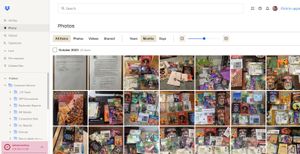
Long story short: I have to free up space and these photos are mysterious in origin -- and I don't know what to call that 'menu item' on the left edge to be able to search for it in help in order to ...

Walter Dropbox Community Moderator
3 years agoDropbox Community ModeratorHey jonsymbolgoodman - sorry to jump in here, but could you navigate to these files and check their version history?
Also, based on your screenshot it seems that you're using a personal account on the Basic plan and those folders are normal folders stored in the account, not shared ones so I'll need you to elaborate on what you mean by '(un)following' them. Were you referring to the relevant feature perhaps?

jonsymbolgoodman
3 years agoExplorer | Level 3
So the account was created to be able to access shared files for work. I haven't linked it to anything, but was 'invited' to join the shared space. I'm the only one in the group who is getting "out of space" notifications, and am trying to figure out how to drop stuff to make space so I can actually work... These are not photos I uploaded, so they came from *somewhere* right?
If I'm the only one whose storage is full, there must be something I'm linked into which no one else is, and this bunch of photos seemed to be the most likely culprit...
- Walter3 years ago
When you say a shared space, do you mean a shared folder perhaps jonsymbolgoodman?
If so, note that those take up space on all of the accounts that are members of the share.
Just to make sure if that's the case, could you check your plan tab and let me know what you see in regards to your quota?
- jonsymbolgoodman3 years agoExplorer | Level 3
So there are a number of terms here that I'm unclear on... we have a number of folders that we use for work, I don't know if there is a collective term for that shared matter or not...
I am thoroughly unclear on why a document that's on the cloud takes up space in multiple accounts, if that's what you're saying. My initial understanding when it was all set up was that the files existed for the company (in some sense) and that those of us who need them could access them as needed and our changes would be saved in the 'master file' so the next person could see them (or indeed, we could see that two of us were working on them simultaneously, as a couple times has been the case). Why this would impact my account, I don't understand.
When things were working, all of the files in the app had a little cloud-and-arrow icon next to them, as if to say, "this is on the cloud, download it if you need it". Then if I accessed a file, I'd have to click it and get a menu with an option to "make online-only", which I would do, presumably so that there would only be one unified version existing solely on the cloud again.
The Photos section seen in my screen grab is not part of the usual work space. I didn't even know it was there until I opened the browser version of the account, having used the desktop app version exclusively at first. So I don't know where it comes from.
I did recently stumble into a section of the account where there was a breakdown of what was in it, and it only added up to something like 1.6 GB or so... wish I'd gotten a screen grab of that, since I can't find that breakdown again right now... but it would be interesting to know what that mean, and why I'm told the account has 2.1 GB in it.
And I do appreciate all the input and help -- thank you!- jonsymbolgoodman3 years agoExplorer | Level 3
So I have folders in the 'collective' that I seriously never need access to... I found in Help that I can remove myself from them with the option to 're-join' them later if the need exists.
However, the terminology/iconography is not pretty:Actually following this advice involves clicking on a trash can icon -- "Delete" and "Trash can" don't feel like the right labels! Doing this, am I really just removing these items for myself and they're still there for everybody else? I don't want to be the person who deleted a large useful file for the entire company.
About Delete, edit, and organize
Solve issues with deleting, editing, and organizing files and folders in your Dropbox account with support from the Dropbox Community.
The Dropbox Community team is active from Monday to Friday. We try to respond to you as soon as we can, usually within 2 hours.
If you need more help you can view your support options (expected response time for an email or ticket is 24 hours), or contact us on X, Facebook or Instagram.
For more info on available support options for your Dropbox plan, see this article.
If you found the answer to your question in this Community thread, please 'like' the post to say thanks and to let us know it was useful!


