Your workflow is unique 👨💻 - tell us how you use Dropbox here.
Forum Discussion

Valdem0rt
2 years agoExplorer | Level 3
Problems saving to Dropbox
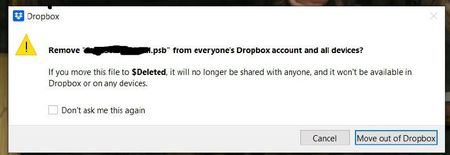
When saving a file, a window pops up asking you to delete this file (remove from everyones dropbox account and all devices...)

vcassidy
1 year agoNew member | Level 2
I too just started getting these messages: every time I save a document to drop box this error appears. I have not had an issue in the past-have been using for a couple of years now. I have a couple of accounts and this started happening with my other one too. When I delete a file I get it and I confirm which is great but doesn't seem right that I get it when saving... Can you help?
This started happening several weeks ago. Today is 5/22/24

Rich Super User II
1 year agoSuper User II
vcassidy wrote:
When I delete a file I get it and I confirm which is great but doesn't seem right that I get it when saving...
It actually depends on how an application is saving a file. In the case of a Save over an existing file, some applications will first delete the original file and save the new one with the same name. If this happens in the Dropbox folder, Dropbox could be picking up on that deletion before the application has had a chance to save the new copy.
Additionally, a lot of applications use temp files which are deleted when a file is saved or closed. Again, if this is within a Dropbox folder, then Dropbox would act on those deletions as well.
In most cases you can simply ignore these messages. I always check the box to not ask again.
- vcassidy1 year agoNew member | Level 2
Thank you for the response, I have tried to check the box not to ask again but it still pops up. I sometimes do save over an existing file and understand that, but this is every time I save a new file it pops up. As I mentioned this has just recently started happening.


About Delete, Edit, and Organize
Solve issues with deleting, editing, and organizing files and folders in your Dropbox account.
The Dropbox Community team is active from Monday to Friday. We try to respond to you as soon as we can, usually within 2 hours.
If you need more help you can view your support options (expected response time for an email or ticket is 24 hours), or contact us on X, Facebook or Instagram.
For more info on available support options for your Dropbox plan, see this article.
If you found the answer to your question in this Community thread, please 'like' the post to say thanks and to let us know it was useful!


