Our Community is in read-only mode until April 8th, learn more here. You can still search existing threads or get help via Dropbox Support, the Dropbox Help Center, or Learn.
Error Messages
109 Topics
Files won't delete, repeatedly removing access won't free up space
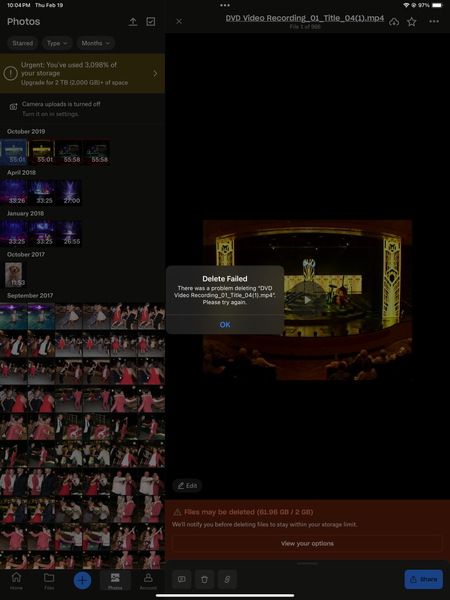
Device - iphone 16 and MacBook Pro Operating System/Browser (if using the web) - Sequoia 15.7.3/Chrome Question or Issue I've had the "You're out of storage" message for about a year but most of my dropbox usage is temporary file viewing (via "viewed links") that is sent to me from other people for quick download to my device then I never see it again. I've had a handful of folders that were "shared" to me over the years with large amounts of pictures and videos but the most recent folder was back in 2019. I've been deleting these same folders and individual files over and over and over tonight and it won't stick. The pop-ups saying they're removed come up, and sometimes, the file would disappear to then reappear again soon after, but most of the time, a pop up would say "xyz folder has been removed from your dropbox" but then I'd be staring right at it, not removed. When I go to "Photos" one random folder of 915 photos is there and (10) 11min-55min long videos that are all from completely different "removed" folders are there and I get an error message that says "there was a problem deleting xyz. please try again." no matter which device I try to delete them on. I've now "removed" literally every folder from my dropbox from every device I have and nothing has changed. It says I have "61.96GB of 2GB used". Please help me solve this!!Solved143Views0likes4Comments
Having issues locating some of my content both online, and the app.
Device Problem happens in all computers and the web version Operating System/Browser (if using the web) Windows 11, Artix Linux Dropbox App Version/Browser Version 241.4.4795/Chrome 144, Chromium 144 Question or Issue I have a huge folder with multiple other folders inside, with names from A to Z. Currently I cannot see any of them that start with a letter after G, with the exception of one that starts with P. Whenever try using the rewind feature in the webapp to get them back, I get an error. How can I fix this? I also don't know when all these folders were removed... Thanks in advanceSolved105Views0likes4Comments
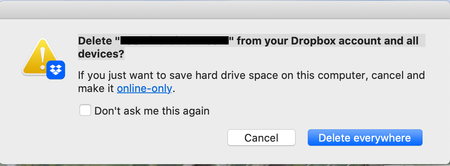
What does the "Delete from your Dropbox account and all devices" message mean?
Using the macOS desktop app. I'm deleting files from Dropbox via Finder like I do in non-Dropbox folders. Please explain what it's asking simply, I do not understand and do not want to do something that I don't want it to do like finding the file on my hard drive and deleting it in a different non-Dropbox folder (which is what it sounds like to me but doesn't really make sense). Thank you.346Views0likes11Comments
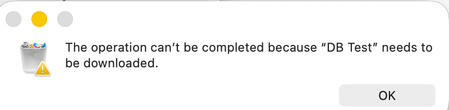
I get an error that my folder needs to be downloaded before deleting it from the desktop app.
Device M1 iMac Operating System/Browser (if using the web) MacOS Tahoe Dropbox App Version (if using the app) 238.4.6305 Question or Issue I attempted to copy the contents of my local Dropbox folder and paste them into another folder. My Dropbox folder remains intact. The files in the folder are available off line and online. I no longer needed the files to be copied and tried to delete the destination folder. When I did I got the following message. I think the issue may be related to the fact that the files are in some Dropbox database. Does anyone know how I can either end what ever process is running or down load the files so I can delete them? Thanks!254Views1like8Comments"This is an unlinked Dropbox" on my app's preferences on Mac Sonoma 14.5.
I cannot access files stored in the dropbox location untill I copy an individual file and paste it elsewhere, how do I fix this whenever I also try to connect it says Your device couldn't connect to server. There might be a problem with the server or network4.3KViews1like36CommentsI'm trying to restore files, but it says I don't have enough space.
Hello - I had a hard drive that died. I downloaded "EaseUS Data Recovery Wizard for Mac" and was able to recover everything. However, when I hit "Recover," then pick DropBox for its destination, it says I don't have enough space, which is wrong. I have 2 TB of space, and I'm only using 8.1% of that space. I AM trying to transfer 550 GB, but I have plenty of room. Anyone know how I can rectify this?Solved239Views0likes6Comments
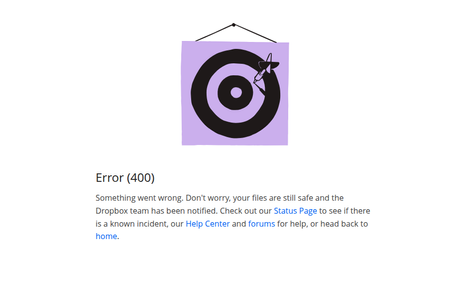
File version history not working. I get a vague error when I try to check.
Question or Issue Since this morning, the file version history no longer works on any file in my dropbox. The error screen that appears is "Error Something went wrong. Don’t worry, your files are still safe and the Dropbox team has been notified. Check out our Status Page to see if there is a known incident, our help center and forums for help, or head back to home." Thanks211Views0likes4Comments
"Couldn't extract files. Can only handle files up to 512 MB."
I have 2TB of available storage on my Dropbox account, but am unable to open a ZIP file (approx. 3.2GB) -- instead, I'm getting an error message that says "Couldn't extract files. Can only handle files up to 512 MB." Any thoughts on how best to resolve this? Thanks.Solved10KViews4likes19CommentsUnable to delete a folder I own. "You don’t have permission to delete files in this folder".
Hi! I'm having difficulty deleting a folder I own. I keep getting an error message "You don’t have permission to delete files in this folder". There are no files in the folder and I have triple checked that I am the owner of the folder. I have also unshared it with any other members.1.3KViews0likes19Comments