Our Community is in read-only mode until April 8th, learn more here. You can still search existing threads or get help via Dropbox Support, the Dropbox Help Center, or Learn.
Error Messages
1672 Topics
My Mac desktop app is unable to sync a file, even though I've removed the invalid character.
Operating System macOS11.7.10 Dropbox App Version (if using the app) 244.4.6580 Syncing Status 1 file is unable to sync Issue While organising and renaming files in Finder, I accidentally typed the \ character in one of the file names. I corrected it almost immediately, but not before Dropbox had registered it as a file that it couldn't upload. Now I'm getting a constant message about how "1 file is unable to sync" and telling me to remove the special character. But that file effectively doesn't exist anymore (at least not with the faulty name). I therefore can't "view" it or "fix" it. And there doesn't appear to be a way of getting Dropbox to drop the matter. How can I get Dropbox to dismiss this now non-existent issue? (The file with the corrected name is syncing just fine, I can view it on Dropbox[dot]com, etc.)40Views0likes1Comment
"Updating 42 files" on Dropbox icon for over a year and two Dropbox folders in Library
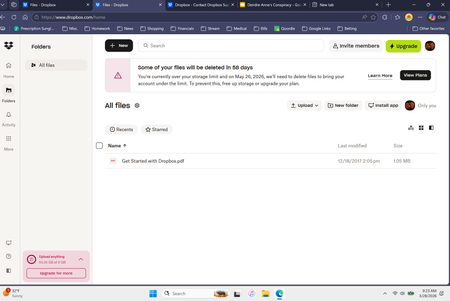
Application Affected Dropbox Mac: Device MiniMacM4, 2024 Operating System/Browser (if using the web) MacOS 26.3.4 Dropbox App Version (if using the app) 244.4.6580 Question or Issue I’ve had the same “Updating 42 files” on my monitor tab icon for over a year. after syncing new addition, it reverts to this notice. There is nowhere I can find what or where these 42 files are to be found. With the disaster of the mixed main filer location since it was moved into the Library, where I now have two folders residing, Things are getting more complicated and less reliable, a situation that seems to go hand in hand everywhere I encounter ‘more complicated.’ In Preferences>Sync>Dropbox folder updates “You are using Dropbox on File Provider. To opt out ... 1st question: how to get rid of “Updating 42 files 2nd question; how to have a single Library folder? Do I have to compare the two folders, file at a time? Cuz that would be a real PIA and I could lose data as several people in this forum have already experienced. files copied with zero info. 3rd question. Does anybody try these new systems out in real world situations? Jay [removed per the Community Guidelines], Kenwood CA37Views0likes1Comment
I see a "syncing with Dropbox is paused" error on my Files app.
Application Affected Files App on iOS 26.4 Device iPad Air 2026 Operating System iOS 26.4 Dropbox App Version (if using the app) 466.2 Question or Issue When I go to files app, under Dropbox it shows Syncing with Dropbox paused. This is only happening on my iPad Air 2026, it works fine on my iPhone and iPad gen9. Same issue is described in 2 other discussions : “Syncing with Dropbox paused” error when I access my Files app on iPad | The Dropbox Community “Syncing with Dropbox paused” error when I access my Files app on iPad | The Dropbox Community The solutions discussed there do not solve my problem.Solved49Views0likes3Comments
Links/syncing stopped working for InDesign files in Dropbox, after Adobe InDesign crashed.
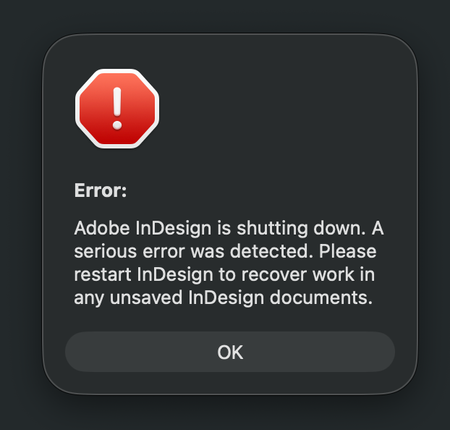
Application Affected Dropbox and Adobe InDesign Device iMac M3 - 2023 Operating System/Browser (if using the web) MacOS Tahoe 26.3.1 (a) Dropbox App Version (if using the app) 244.4.6580 In advanced, I'm sorry for my long text and spelling errors) I have a shared Dropbox with my colleges, and I work from home. Earlier this week I was working in InDesign, and it crashed while I was working. A message said it was a serious error, but no info what the error was about. (I have attached several screenshots below) Anyway, I started InDesign again, but the document I was working on could not be opened, because it was damaged. I work as a freelance book designer, but luckily for me I was only working on a book cover, and not the inside of the book. It was annoying, but not the end of the world. This was just the beginning. Now every single time I open an InDesign document from Dropbox, all the links is just shown as blank, like there is nothing there. It's just like a white new document, with nothing there, only the text. Nothing is linked anymore, and I have to link every singe images again. Let's say I have 50 images in a folder, it doesn't link everything at once, which is crazy annoying and extremely time consuming. Sometimes when I open a document in InDesign it seems fine for one second, but then all the images shows up like "crazy art" (screenshot 2) After I link an image, it seems to be okay the next time I open the document, luckily. But I have a lot of book projects and it's a crazy amount of time fixing everything manually. I also get weird messages when opening a document (the bottom screenshots) It also seems to be a problem when I have a document open, and want to edit a picture. I choose to open the picture in Photoshop, and edit there. When saving the document, it usually update the file in InDesign automatically, but not now. I guess it's just a part of the same problem. I have no idea what to do to fix the problem. All Indesign documents on my computer is fine, so the problem is only between Dropbox and Indesign, and not InDesign alone. I always work with the documents/folders (available offline) and I have never had a problem with this before the crash. I have already contacted Dropbox customer service. After a lot of back and forth, they said the problem is with Adobe. Then I contacted Adobe (which has terrible customer service) and they told me the problem is Dropbox. So here I am, with no clue on how to fix the problem. I have restarted Indsign and Dropbox, but nothing changed. I don't know what will happen with new documents placed in dropbox yet, but fingers crossed the issue will not effect new work. Time will show after the Holiday. Happy Stressfull Easter to me I guess :P77Views0likes4Comments
How can my client send me files larger than 5GB, if they don't have a Dropbox account?
I have dropbox plus account. My client does not have a dropbox account. Nor does he want one. How can he send me files that are 5gb and up? I'm always getting hit with the 2gb limit. I'm in video production and 2gb files are nothing. We work with files that range from 2gb to 50gb. We don't want to make our clients open accounts that they don't want. Thoughts? Thanks.Solved69Views0likes5CommentsDropbox is running in the background, but the Dropbox icon doesn't appear on my macOS Tahoe 26.3.1.
Description I’m experiencing a persistent issue where Dropbox will not start correctly on macOS. The app launches background processes, but the UI never appears, the menu bar icon does not show, and I cannot open Dropbox preferences. System Information Device: MacBook Pro 14-inch (Apple silicon) Chip: Apple M5 Memory: 32 GB macOS: Tahoe 26.3.1 Dropbox version: 244.4.6580 Behavior * Dropbox processes are running in Activity Monitor and via terminal * No menu bar icon appears * No UI window opens * Preferences cannot be accessed * Files may partially sync in the background Error Message "Couldn't start Dropbox. This may be a temporary error. A provider with ID com.getdropbox.dropbox.fileprovider was found, but is in the process of being invalidated." Troubleshooting Performed * Full uninstall and reinstall of Dropbox multiple times * Deleted all Dropbox-related folders: ~/Library/Application Support/Dropbox ~/.dropbox ~/Library/Group Containers/G7HH3F8CAK.com.getdropbox.dropbox.sync * Restarted the Mac multiple times * Reset Finder, fileproviderd, and bird * Reset SystemUIServer (menu bar) * Verified processes via terminal (ps aux) * Manually launched Dropbox binary Key Observation When I create a new macOS user account, Dropbox works perfectly: * Menu bar icon appears * UI loads normally * No errors This suggests the issue is isolated to my primary user environment. Request I need assistance fully resetting or clearing the File Provider integration and user-level Dropbox state so Dropbox can launch correctly in my main user account.84Views0likes5Comments
Dropbox Fax keeps saying that the country code I've added is wrong.
Trying to send a fax in dropbox fax, but get the error of incorrect country code. Even though the correct country was automatically detected. Trying to change the number to start with 00 instead of + made it automatically add a 4 and hence tries to send it to the wrong number.90Views0likes7Comments
I'm trying to update the email address of my Dropbox account, but it says it's taken.
Dropbox Plan Plus Do you have access to the email linked to the account? Can only receive email, not send, but takes a long time to come through. Are there any devices connected to your Dropbox account? PC Question or Issue I am trying to transfer my account over to my new gmail e-mail address, but I get error message saying that address is already taken.165Views0likes6Comments