Your workflow is unique 👨💻 - tell us how you use Dropbox here.
Forum Discussion

IDLVR
5 years agoExplorer | Level 3
Unable to delete files... which cannot be unlocked
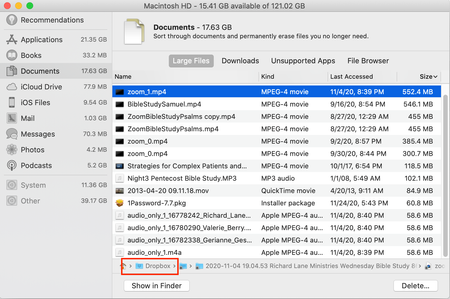
I am attempting to delete some rather large files from my wife's computer so she can update to the latest version, Big Sur, for her Macbook Air. She previously downloaded the files from her minister...
- 5 years ago
Hi IDLVR, thanks for joining the Community!
It looks like the filepath is showing a shared folder to which you have read-only access. This means that you can't add, edit, or delete any files in this folder, which is why you can't delete it from your account or machine.
The Dropbox folder should be located in Finder on the left hand column. If you can't see the shortcut there, you can click the Dropbox icon in the menu bar, then the folder icon to locate the folder itself.
If need be, you can use selective sync to prevent that entire folder from syncing to your machine. You'll still be able to access it from the Dropbox site without any issues.
If you need any more details, feel free to message back!

Jay Dropbox Community Moderator
2 years agoDropbox Community ModeratorHi marilynaspen, is the file in a shared folder to which you have edit or read only access?

marilynaspen
2 years agoNew member | Level 2
Hi,
I believe "read only access" file.
Thank you
- Jay2 years ago
If the file is in a shared folder with read-only access, then you can't make any changes to the files in the folder, including deleting them.
About Delete, Edit, and Organize
Solve issues with deleting, editing, and organizing files and folders in your Dropbox account.
The Dropbox Community team is active from Monday to Friday. We try to respond to you as soon as we can, usually within 2 hours.
If you need more help you can view your support options (expected response time for an email or ticket is 24 hours), or contact us on X, Facebook or Instagram.
For more info on available support options for your Dropbox plan, see this article.
If you found the answer to your question in this Community thread, please 'like' the post to say thanks and to let us know it was useful!


