We're making some changes to the Dropbox Community 👩💻 - Find out more here.
Forum Discussion

suibom
2 years agoHelpful | Level 5
Can't understand the meaning of the Dropbox icon in the finder and it doesn't sync.
My system info
HW: Apple M1 Pro
OS: Ventura 13.5 (22G74)
Dropbox ver: v180.3.4837 & joined beta
Dropbox beta has an incomprehensible behavior when using the file provider feature on macOS...
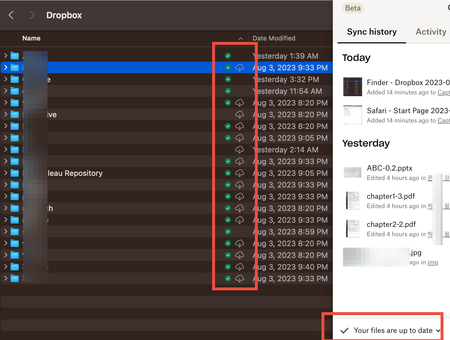
- 2 years ago
The previous article described the icons you would see in Finder.
- The green sync icon means the file is available offline
- No icon means it's 'available'. This means you doubleclicked it to open, and it's stored on your computer. However, if you're low on hard drive space, the Mac OS will delete the local copy to free up space
- Cloud icon with a down arrow means it's online-only.
- This would only apply to entire folders. Individual files won't have two icons at the same time.

Jay Dropbox Community Moderator
2 years agoDropbox Community ModeratorThe previous article described the icons you would see in Finder.
- The green sync icon means the file is available offline
- No icon means it's 'available'. This means you doubleclicked it to open, and it's stored on your computer. However, if you're low on hard drive space, the Mac OS will delete the local copy to free up space
- Cloud icon with a down arrow means it's online-only.
- This would only apply to entire folders. Individual files won't have two icons at the same time.

g v.
2 years agoCollaborator | Level 10
Jay wrote:
- No icon means it's 'available'. This means you doubleclicked it to open, and it's stored on your computer. However, if you're low on hard drive space, the Mac OS will delete the local copy to free up space
Hi Jay, does this mean I cannot have all things on my drive at all times any more?
Thanks
About Create, Upload, and Share
Find help to solve issues with creating, uploading, and sharing files and folders with Dropbox.
The Dropbox Community team is active from Monday to Friday. We try to respond to you as soon as we can, usually within 2 hours.
If you need more help you can view your support options (expected response time for an email or ticket is 24 hours), or contact us on X, Facebook or Instagram.
For more info on available support options for your Dropbox plan, see this article.
If you found the answer to your question in this Community thread, please 'like' the post to say thanks and to let us know it was useful!


