Our Community is in read-only mode until April 8th, learn more here. You can still search existing threads or get help via Dropbox Support, the Dropbox Help Center, or Learn.
Forum Discussion

altenae
8 years agoHelpful | Level 5
Changes Bitrate and File size after sync.
I hope someone is able to tell me what is going on here....
I have made a 4k 60PFS recording on my iphone 8 plus.
The file properties of this mov file is around 42 MB an the Bitrat...
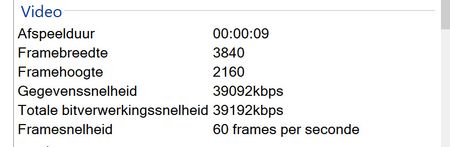
 8 years agoWow... you are 100% correct.
Seems the Original file is not playing very well on my computer. (high specs...;latest I7 and one of the fastest GeForce Card and still choppy)
Thank you very much for helping me out.
Now I know exactly what is going on.
Thanks !!

Mark Super User II
8 years agoSuper User IIAre you using the Dropbox official apps to upload?
You using Camera Upload to add the file to Dropbox?
If so can you try adding it manually via the + symbol.
You using Camera Upload to add the file to Dropbox?
If so can you try adding it manually via the + symbol.
altenae
8 years agoHelpful | Level 5
Are you using the Dropbox official apps to upload?
Yes
You using Camera Upload to add the file to Dropbox?
Yes
If so can you try adding it manually via the + symbol.
Did the manual with the + symbol and the share button ... tried all.
Stil the same adjustment to the file
Yes
You using Camera Upload to add the file to Dropbox?
Yes
If so can you try adding it manually via the + symbol.
Did the manual with the + symbol and the share button ... tried all.
Stil the same adjustment to the file
- Mark8 years agoiOS 11?
Which version of Dropbox?
I know there are some issues with uploading in iOS11 so it maybe worth logging a ticket at www.dropbox.com/support which you can then track at http://dropbox.zendesk.com- altenae8 years agoHelpful | Level 5
Yes correct IOS 11.01
Dropbox version IOS 64.3.4
Dropox version 35.4.20..
Also did the upload test with Onedrive ans just like Google drive no adjustments...
It only happen with Dropbox
- Mark8 years agoYou need to log a ticket with support I'm afraid then.
About Create, Upload, and Share
Find help to solve issues with creating, uploading, and sharing files and folders with Dropbox.
The Dropbox Community team is active from Monday to Friday. We try to respond to you as soon as we can, usually within 2 hours.
If you need more help you can view your support options (expected response time for an email or ticket is 24 hours), or contact us on X, Facebook or Instagram.
For more info on available support options for your Dropbox plan, see this article.
If you found the answer to your question in this Community thread, please 'like' the post to say thanks and to let us know it was useful!


