Your workflow is unique 👨💻 - tell us how you use Dropbox here.
Forum Discussion

dancassidy
3 years agoExplorer | Level 3
Creating a link and sharing problem
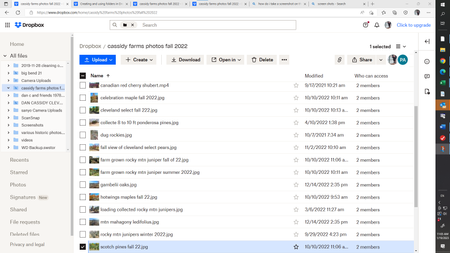
i can't seem to create a link to photos in the drop box folder i am using. instead of sharing just the photos when i copy the link to my email to share with others, the whole drop box screen includin...

Hannah Dropbox Community Moderator
3 years agoDropbox Community ModeratorHey dancassidy, thanks for joining our Community!
After you create and copy the link, are you opening it from the same browser you're already logged into? That might the issue here.
Can you copy and open the link using a different browser or a private browsing window, to see if it works?
Keep me posted.
 dancassidy3 years agoExplorer | Level 3
i did it but because chome is not my default browser my local email server can not be added for some reason. i tried. so even though i got done there was still extraneous stuff on the file. so here it is on drop box. i guess the green checks indicate the files have been copies successfully onto one drive or so i think.
- dancassidy3 years agoExplorer | Level 3
i meant the image is of file explorer
- Jay3 years ago
Hi dancassidy, could you clarify exactly what you're creating? If you're still seeing the sidebar, then you might've created a shared folder.
If you want to create a shared link with view-only permissions to that folder for others to view on the site, then you can follow these steps.

About Create, Upload, and Share
Find help to solve issues with creating, uploading, and sharing files and folders with Dropbox.
The Dropbox Community team is active from Monday to Friday. We try to respond to you as soon as we can, usually within 2 hours.
If you need more help you can view your support options (expected response time for an email or ticket is 24 hours), or contact us on X, Facebook or Instagram.
For more info on available support options for your Dropbox plan, see this article.
If you found the answer to your question in this Community thread, please 'like' the post to say thanks and to let us know it was useful!


