Our Community is in read-only mode until April 8th, learn more here. You can still search existing threads or get help via Dropbox Support, the Dropbox Help Center, or Learn.
Forum Discussion

ajw1414
6 years agoHelpful | Level 6
Dropbox link keeps changing
Morning,
I have a excel file on dropbox where I setup a macro to have a powerquery run overnight to pull data from our databases and then save. What we call our master data excel file.
Afterward...
- 6 years ago
Thank you all for the response.
I ended up submitting a ticket in through Dropbox. This appears to be related to a update they performed. They rolled back for my individual file and the link appears to be staying the same now.
We ended up moving our master data file to a local drive. This does mean we have to relink 250 files, but at least we have control of such issues in the future, but I wanted to post here in case others have the same issue going forward. Good luck.
I just received an update from our engineering team with news on a temporary fix.
It looks like we were able to isolate this issue to a recent update of ours. While we're working to get this fixed, we've rolled back the update for your account and I've verified that the machine you contacted us about initially, "CHS4156695", has reverted that update.
My team will continue to work on getting this fixed - but we didn't want that to be at the cost of your productivity.
I'm going to leave this ticket on-hold for the time being as I monitor for updates, but you should be good to go.
markbroemer
6 years agoHelpful | Level 5
Hello - this has been happening to me as well for the last week or ten days - over the years I have provided clients a link with a PDF file that is updated daily on our end, and this link has remained active for years. Recently everytime I have saved over the old PDF with the current version, the old link has become inactive and I have to generate and send a new link to my clients and collegues. This has been very frustrating as the clients think it is something we have done on our end.

Walter Dropbox Community Moderator
6 years agoDropbox Community ModeratorHi markbroemer - welcome to our Community!
This definitely sounds strange; would you like me to reach out via your Dropbox associated email address so I can look into this with all of our tools at my disposal?
In the meantime, could you forward me a screenshot of the error you get when you access the mentioned -now inactive- shared link?
Thanks!
- markbroemer6 years agoHelpful | Level 5
It's a 404 error - here is the now inactive link created earlier today that got broken after saving a new file over the original file:
https://www.dropbox.com/s/l3iqv2wlr457mhf/INVENTORY_DOCUMENT_-_FOR_INTERNAL_USE.pdf?dl=0
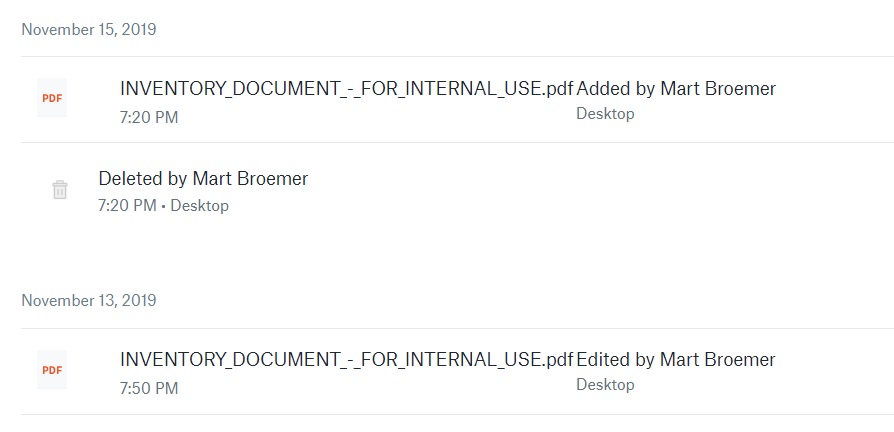
Looking at the version history of this file - prior to November 15, any files copied over the original were processed in Dropbox as an edit of the original document. Starting November 15, the same action is causing the file in Dropbox first to be deleted and then the new version is created as a new file with a subsequent new public link.
- Walter6 years ago
I see. Thanks for the additional details Mart.
Could you see if this is also happening on another browser or an incognito window with no extensions or plugins running?
If you're editing (overwriting) your file within your computer's Dropbox folder directly when you notice this happening, I'd really like to investigate further so please let me know if I could use the email address that's connected to your Community's profile to create a support ticket for you.
Thanks once again Mart!
- markbroemer6 years agoHelpful | Level 5
I have a ticket in with the Dropbox support team - I'll update here if I get any resolution to this problem.
- ajw14146 years agoHelpful | Level 6
Morning Mark,
I wanted to check back and see if you had any luck with this issue? Submitting a ticket to Dropbox today as well, but seeing if they resolved on your end. Thank you
- markbroemer6 years agoHelpful | Level 5
Sorry about the late reply - the e-mail with your question landed in my spam box. The Dropbox support team earlier this week sent me a link to download a new beta version of their Dropbox program which I installed. I still have the same issue though - anytime I copy/paste a file from one folder to my Dropbox folder, the Dropbox server is interpreting it as first deleting the file (and link) and adding a new file (with subsequent new link). They asked me afterwards to send a screencast to show what I am doing so that they can understand more the issue. I hope this helps! -Mark
About Create, Upload, and Share
Find help to solve issues with creating, uploading, and sharing files and folders with Dropbox.
The Dropbox Community team is active from Monday to Friday. We try to respond to you as soon as we can, usually within 2 hours.
If you need more help you can view your support options (expected response time for an email or ticket is 24 hours), or contact us on X, Facebook or Instagram.
For more info on available support options for your Dropbox plan, see this article.
If you found the answer to your question in this Community thread, please 'like' the post to say thanks and to let us know it was useful!


