Your workflow is unique 👨💻 - tell us how you use Dropbox here.
Forum Discussion

boomfly
3 years agoExplorer | Level 4
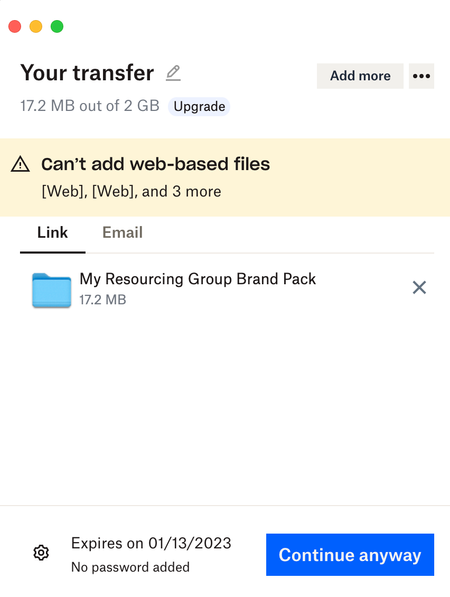
Dropbox Transfer: "Can't add web-based files"
Hi, I'm not sure if this is the right method to report a bug. I'm experiencing a bug with the Dropbox Transfer function of the desktop app (MacOS). I have located a folder that I want to send using t...

Megan Dropbox Community Moderator
3 years agoDropbox Community ModeratorHi boomfly, how are you today?
Interesting! You mentioned, that the files in that folder are offline. Could you clarify if you meant that they're available offline, or offline-only?
Also, which version of our app do you use on your end?
Let me know more, and we'll take it from there!
 Ellen3 years agoExplorer | Level 4
Just popping in to say I found the same bug. I had a folder called "web" and got the same error message as above, then changed that folder name to "online" and no more error message.
- boomfly3 years agoExplorer | Level 4
Hi Ellen , I'm glad it's not just me! Renaming the folder also worked for me too. Hopefully Dropbox can fix it so we don't have to rename as a workaround.
- Megan3 years ago
I see, very interesting!
Would it be okay for me to reach out via email, in order for us to look into this, Ellen?
- boomfly3 years agoExplorer | Level 4
Hi Megan,
Thanks for your response. I think I may have confused things by mentioning offline. All files in the folder are available on my local hard drive and they are synced to Dropbox - they are showing a green tick so they are both offline and online. The desktop app version is v164.4.7914. Hope that helps.
- boomfly2 years agoExplorer | Level 4
Hi, still not fixed in v181.4.5678
About Create, Upload, and Share
Find help to solve issues with creating, uploading, and sharing files and folders with Dropbox.
The Dropbox Community team is active from Monday to Friday. We try to respond to you as soon as we can, usually within 2 hours.
If you need more help you can view your support options (expected response time for an email or ticket is 24 hours), or contact us on X, Facebook or Instagram.
For more info on available support options for your Dropbox plan, see this article.
If you found the answer to your question in this Community thread, please 'like' the post to say thanks and to let us know it was useful!


