Your workflow is unique 👨💻 - tell us how you use Dropbox here.
Forum Discussion

genieprimetime
1 year agoExplorer | Level 3
How can I directly access a file from a shared Dropbox link?
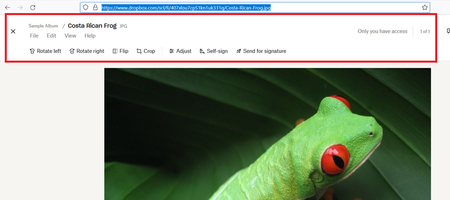
Hi, I want to create a shared link to a file stored in Dropbox that is view only. I can do that but the link that is generated always displays the image surrounded by the Dropbox interface. I would...

genieprimetime
1 year agoExplorer | Level 3
Hi, thanks for your response but still a nogo. In the image attached, you can see from another image hosting website the type of 'direct' url that I can embed into my 3rd party application to display as part of a report or dashboard. I just don't see that in Dropbox.

Здравко
1 year agoLegendary | Level 20
Hi genieprimetime,
Did you try to just append "&raw=1" to the link? If not try it. 😉
Hope this helps.
Edit: My mistake! For this link you would need to append "?raw=1". (it's the only param here)... Or not...🤔 Are you sure the link match to the image? I don't think so... You have edited it! In all case just replace the initial "dl=0" to "raw=1" (either prepended with '?' or'&' - keep the original).
About Create, Upload, and Share
Find help to solve issues with creating, uploading, and sharing files and folders with Dropbox.
The Dropbox Community team is active from Monday to Friday. We try to respond to you as soon as we can, usually within 2 hours.
If you need more help you can view your support options (expected response time for an email or ticket is 24 hours), or contact us on X, Facebook or Instagram.
For more info on available support options for your Dropbox plan, see this article.
If you found the answer to your question in this Community thread, please 'like' the post to say thanks and to let us know it was useful!


