Our Community is in read-only mode until April 8th, learn more here. You can still search existing threads or get help via Dropbox Support, the Dropbox Help Center, or Learn.
Forum Discussion

Dean G.4
2 years agoHelpful | Level 5
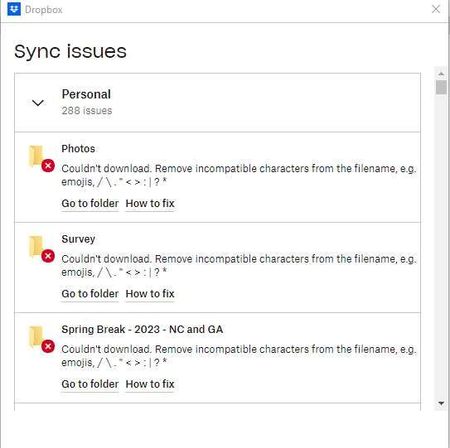
How Do I Clear the List of "Sync Issues" after I have resolved the issues?
How Do I Clear the List of "Sync Issues" after I have resolved the issues?
There is no way to check them off as completed, and there is no way to delete them (at least that I can find!). That ...

Megan Dropbox Community Moderator
2 years agoDropbox Community ModeratorHi Dean G.4, when you say that you manually uploaded them, do you mean through the web?
If you use the web, in order to rename these files, do you notice a difference? If not, feel free to send me another screenshot of the message you get.

SparkyCanada
2 years agoNew member | Level 2
I am having this issue as well.
Using Mac Ventura 13.4.1
Dropbox Version 180.4.4912
Restarting has not cleared the list...
Was there ever a solution to this?
Thanks,
SparkyCanada
- Calvin2DBX2 years ago
Hi SparkyCanada,
Nice to e-meet you!
Can you send a screenshot of the sync status, please?
At the bottom of the window, there'll be a bar with text that says "Your files are up to date", "Syncing [filename]", "Syncing [x] files", or "Syncing paused until [x]".
Let me know what you find.

About Create, Upload, and Share
Find help to solve issues with creating, uploading, and sharing files and folders with Dropbox.
The Dropbox Community team is active from Monday to Friday. We try to respond to you as soon as we can, usually within 2 hours.
If you need more help you can view your support options (expected response time for an email or ticket is 24 hours), or contact us on X, Facebook or Instagram.
For more info on available support options for your Dropbox plan, see this article.
If you found the answer to your question in this Community thread, please 'like' the post to say thanks and to let us know it was useful!


