Our Community is in read-only mode until April 8th, learn more here. You can still search existing threads or get help via Dropbox Support, the Dropbox Help Center, or Learn.
Forum Discussion

ckoz2015
11 months agoExplorer | Level 3
Is it necessary to have to verify identity when accessing a shared folder through a link?
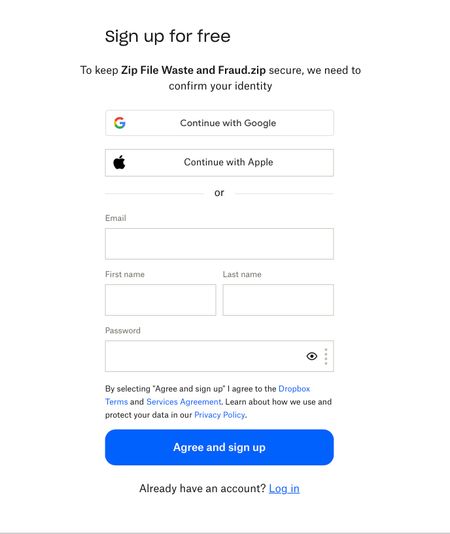
I shared a folder to "anyone with the link". When someone tries to access it from a new browser (never signed in to Dropbox before) they are always hit with a message to verify identity.
...

ckoz2015
11 months agoExplorer | Level 3
Hi Nancy,
Here is the link that I copied to the PDF:
link removed
Here is the screenshot:
I will create another folder and use an incognito window.
ckoz2015
11 months agoExplorer | Level 3
Here is a screenshot. I created a new Test folder. The Chrome incognito window is fine, the Safari window still shows the Confirm Identity message.
The folders name is Test Folder.
[link removed as per Community Guidelines]
- Megan11 months ago
Dropbox Community Moderator
Hey ckoz2015, I was wondering if maybe you're creating a "can edit" permission link, instead of a "can view".
Can you try out these steps instead?
Once your link is ready, try to open it from an incognito tab while you're not signed into your Dropbox account, and let me know what you find.
- ckoz201511 months agoExplorer | Level 3
Hi Megan,
Here is a screen shot of where I copied the link from, I was on View Tab and clicked copy link.
I then pasted the link to a PDF, then copied that link into Safari and still see that message.
Here is the link I used:
[removed per Community Guidelines]
- Nancy11 months ago
Hi again, ckoz2015! After testing your shared link, it’s working alright for me.
Can you take this one step further and test the link from an incognito window on your Safari browser as well and let me know if it works, like it did for your Chrome browser?


About Create, Upload, and Share
Find help to solve issues with creating, uploading, and sharing files and folders with Dropbox.
The Dropbox Community team is active from Monday to Friday. We try to respond to you as soon as we can, usually within 2 hours.
If you need more help you can view your support options (expected response time for an email or ticket is 24 hours), or contact us on X, Facebook or Instagram.
For more info on available support options for your Dropbox plan, see this article.
If you found the answer to your question in this Community thread, please 'like' the post to say thanks and to let us know it was useful!


