Our Community is in read-only mode until April 8th, learn more here. You can still search existing threads or get help via Dropbox Support, the Dropbox Help Center, or Learn.
Forum Discussion

Juan95
5 months agoExplorer | Level 3
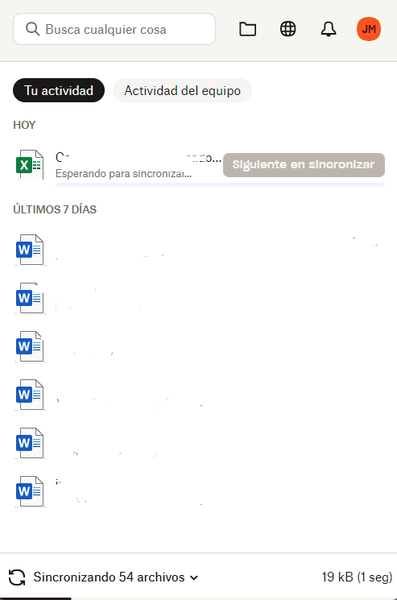
My Windows 11 desktop app is stuck syncing one file.
Application Affected
Dropbox Desktop Device
Dell Vostro 3520 Operating System/Browser (if using the web)
Windows 11 Dropbox App Version (if using the app)
235.4.5905
Hi,
My Dr...

danv13
4 months agoHelpful | Level 5
I think I am having the same problem on Windows 11 using Dropbox version 235.4.5905. Dropbox is constantly churning the disk syncing 2 files and eating CPU time. No sync issues are shown. The Dropbox folder contains 50.4 GB and 63,905 files. I can't determine what 2 files are causing this problem, but all other files are syncing successfully. No other devices in my account are having this problem, but this is the only device on Windows 11. I have uninstalled and reinstalled the Dropbox application but it didn't solve the problem. I tried Fix Hardlinks and Fix Permissions. The Flexible Filenames option is turned on. What can I do to help troubleshoot this problem? I have been a satisfied Dropbox user for many years. Thanks!
- Jay4 months ago
Dropbox Community Moderator
Hi danv13, as you've already tried some of the steps we would suggest, in order to look into this matter in more detail, I'd recommend contacting the support team directly for them to investigate further.

About Create, Upload, and Share
Find help to solve issues with creating, uploading, and sharing files and folders with Dropbox.
The Dropbox Community team is active from Monday to Friday. We try to respond to you as soon as we can, usually within 2 hours.
If you need more help you can view your support options (expected response time for an email or ticket is 24 hours), or contact us on X, Facebook or Instagram.
For more info on available support options for your Dropbox plan, see this article.
If you found the answer to your question in this Community thread, please 'like' the post to say thanks and to let us know it was useful!


