Our Community is in read-only mode until April 8th, learn more here. You can still search existing threads or get help via Dropbox Support, the Dropbox Help Center, or Learn.
Forum Discussion

CandaceHunter
2 years agoNew member | Level 2
Scrivener files apparently not syncing
Hi! I've been using Dropbox to sync my Scrivener files across my Macbook Pro, Mac Mini, iphone and ipad. This has been working beautifully for years. I updated Scrivener on my desktop, and now dropbo...
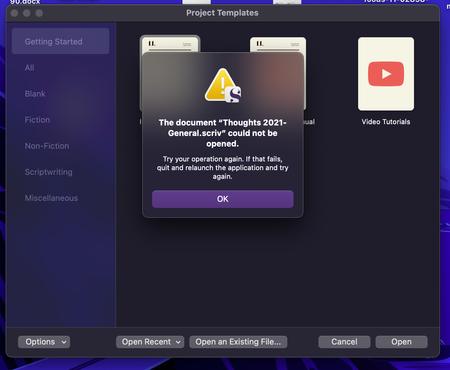
- 2 years ago
Hi CandaceHunter, thanks for bringing this to our attention.
Since this occurred after updating Scrivener, is it possible that the newer version makes some changes to the way the scriv files are being made?
You mentioned that the files have a cloud icon on them. Could you try first marking the file as available offline, and then see if it opens normally on your machine?
This will help me to assist further!

Jay Dropbox Community Moderator
2 years agoDropbox Community ModeratorHi CandaceHunter, thanks for bringing this to our attention.
Since this occurred after updating Scrivener, is it possible that the newer version makes some changes to the way the scriv files are being made?
You mentioned that the files have a cloud icon on them. Could you try first marking the file as available offline, and then see if it opens normally on your machine?
This will help me to assist further!

CandaceHunter
2 years agoNew member | Level 2
Hi Jay,
Thanks for the response. I was typing my last reply when you posted yours. Scrivener didn't change how they manage the files. Had they, at least one of the unaffected ones would have stopped working, too, as I had used and synced it successfully across several devices after the Scrivener update. I have no clue why some of the files stopped being available offline and others in the same folder didn't. But, I selected the folder and told it to make everything available offline. That seemed to fix the problem.
- Jay2 years ago
Thanks for the update, I'm glad to hear that marking the folder as offline helped to resolve the issue!
About Create, Upload, and Share
Find help to solve issues with creating, uploading, and sharing files and folders with Dropbox.
The Dropbox Community team is active from Monday to Friday. We try to respond to you as soon as we can, usually within 2 hours.
If you need more help you can view your support options (expected response time for an email or ticket is 24 hours), or contact us on X, Facebook or Instagram.
For more info on available support options for your Dropbox plan, see this article.
If you found the answer to your question in this Community thread, please 'like' the post to say thanks and to let us know it was useful!


