Our Community is in read-only mode until April 8th, learn more here. You can still search existing threads or get help via Dropbox Support, the Dropbox Help Center, or Learn.
Forum Discussion

leoheck
3 years agoHelpful | Level 6
[Solved, Ubuntu 22.04] Dropbox is always "Connecting..."
Hi, Dropbox tray icon says it is "Connecting..." forever. I cannot see the list of the latest modified files as it used to show or use the tray, actually. I am using Linux Ubuntu 22.04 ...
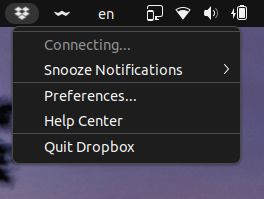
 3 years ago
Hey folks,
I found an extension that solves this issue for me. It worked immediately as soon as I installed the extension. No reboot or logout was required.
I just have to point out I am using Ubuntu 22.04.
https://extensions.gnome.org/extension/615/appindicator-support/
I was and still also using this extension to display old tray icons. Maybe it is also important.
https://extensions.gnome.org/extension/2890/tray-icons-reloaded/
Now I am happy again, here is the proof to make you happy too.
Mod note:
Please note that Dropbox is only supported on vanilla builds of Ubuntu 14.04 or later, or Fedora 21 or later.
We don't officially support forks or variants of these operating systems, or other flavors of Linux at this time.
You can learn more about our supported distros for Linux here.

Jay Dropbox Community Moderator
3 years agoDropbox Community ModeratorThanks for the info, I'd recommend getting in contact with the support team directly for further assistance.
Once you get a ticket ID from the automated response, please let me know the number here so I can locate it in our system.

le_avion
3 years agoCollaborator | Level 8
I did open a ticket on 6/21/22 and it was suggested to me by support to check this thread. I hope this is not where the ticket handling ends.
- le_avion3 years agoCollaborator | Level 8
Ticket #17553453
Thanks.
- Megan3 years ago
Hi le_avion, thank you for this!
I can see that the agent you're working with, got back to you in order to continue troubleshooting. If you have any questions, or additional info, feel free to reply back to them there.
If you need anything else, give me a shout.
- le_avion3 years agoCollaborator | Level 8
This is absolutely ridiculous.
Me and the agents keep going back and forth via email and now the agent closed the case as resolved when it is in fact not resolved.
How hard is it for your support team to do what support teams are supposed to do: do a clean install of Ubuntu 22.04 LTS and of POP OS 22.04 LTS and test it for themselves. Instead they keep asking questions like "try to connect to another network" (as if people have access to multiple networks) to "help pinpoint" the problem. They keep asking me to see if I can access your website ignoring completely the information I gave them that (1) yes, I can access the web site and (2) that sync works but the status doesn't change from Connecting... and no stats are being displayed and (3) that I have 3 computers: Windows 10, Ubuntu 20.04 LTS and POP OS 22.04 LTS and only the newer one running 22.04 LTS has this issue. They send me to this thread and ignore that fact that multiple people complain about this bug and they are all running the latest version of Ubutnu or POP OS.
 alanpmuscat3 years agoHelpful | Level 6
le_avion thanks for the feedback even though it is bad news.
@Dropbox I have exactly the same issue as le_avion. I have two machines, one with Pop!_OS 20.04 LTS and another with Pop!_OS 22.04 LTS. The issues are occurring on the latest version 22.04 LTS.
To reiterate:
(1) Sync is working well on both versions.
(2) I can connect to the Dropbox website fine and that works well on both machines.
(3) On the 22.04 LTS machine the taskbar app is showing always "Connecting" and no information/statistics regarding usage at all. <== THIS IS THE ISSUE!!
Please, please solve this for us.
 lanmosel3 years agoNew member | Level 2
I also have the exact same issue as le_avion and alanpmuscat. I have a Dell XPS with Pop!_OS 22.04 LTS. I recently switched from paid iCloud to paid Dropbox specifically for the Linux app / support. It's disappointing to see the circular loop here between the forum and service team. Hoping this gets resolved.
- le_avion3 years agoCollaborator | Level 8
The latest from my support saga:
"I will advise you to please install an older version of the application through the link below:
https://www.dropboxforum.com/t5/Dropbox-desktop-client-builds/Stable-Build-147-4-4800/td-p/593490 "No instructions, no nothing. So I stop Dropbox, move the original .dropbox-dist aside, expand the archive to create a new .dropbox-dist, start Dropbox and.... Nothing changed. The same behavior, just with an older version of Dropbox.
May I suggest Dropbox support to try it for themselves before sending us on a goose chase?Here is where you can download the install ISOs in case Google doesn't work for you:Ubuntu 22.04 LTS install: https://ubuntu.com/download/desktopPOP OS 22.04 install: https://pop.system76.com/ - leoheck3 years agoHelpful | Level 6> How hard is it for your support team to do what support teams are supposed to do: do a clean install of Ubuntu 22.04 LTS and of POP OS 22.04 LTS and test it for themselves.
Dude, try it yourself, honestly. - leoheck3 years agoHelpful | Level 6
Hey,
I was validating my solution here on a clean install of Ubuntu 22.04 for you.
In this setup, Dropbox works out of the box.
These are the steps I did, not all of them are required, but I am listing them here anyway.
1. [optional] Install Ubuntu 22.04 in a Virtualbox.
2. [optional] Install gcc and make `sudo apt install gcc make`
3. [optional] Install Guest Additions (to have better integration with my Host OS, and better screen resolution)
4. [optional] Update apt sources (sudo apt update)
5. [optional] Upgrade existing software (sudo apt upgrade)6. Install Dropbox (64-bits)
cd ~ && wget -O - "https://www.dropbox.com/download?plat=lnx.x86_64" | tar xzf -7. Launch Dropbox, manually.
~/.dropbox-dist/dropboxd8. The tray may be visible now.
9. Click the tray and check if you can log in from there.
10. Login using your credentials.11. There is this preference to start Dropbox with the computer, but it is just not working. Check this option, close the window, and open the Dropbox Preferences again, so you can check by yourself that this setting is not getting marked for some reason.
Dropbox tray > Preferences > Start Dropbox with the computer
12. Reboot the system, Dropbox may not start, then you can launch manually with step #9.
Dropbox looks working on a Fresh Install of Ubuntu.
Now, my system was not a Fresh Install, I have some Gnome apps installed too, so maybe they are doing something that prevents dropbox from starting.
Now, on my current working system, that setting to "Start Dropbox on system startup" is checked and working as you can see here.
- leoheck3 years agoHelpful | Level 6
It works, as it is supposed to work dude.
Please, try it yourself. I've put all the required steps here. Don't be lazy like other people that you were complaining about before.
And Yes, it shows everything.
This is my host OS, Ubuntu 22.04, the one that I had to apply the fix the way I have indicated with the reply marked by me as the Solution. Everything is there, including the "Recently changed files". Here I had my ~/.Dropbox folder, and other dropbox-related folders in my home folder.
This is the run I tried on a Virtualbox, with a Fresh Clean Install of Ubuntu 22.04. Since this was a clean install, it did not have the default dropbox folders in my home directory. This is the 2nd time I am installing this Virtualbox to take this picture, I have deleted the previous one.
To have Nautilus integration, including the command line you have to install this:
sudo apt install nautilus-dropbox
If you run "dropbox" from the command line, you should see the deprecation warning of a function.
You can fix it with this command:
sudo sed -i "s/isSet/is_set/g" /usr/bin/dropbox
Then the Dropbox folder will gain the synchronization symbols like this one
And then files are going to be added with the speed of your network
After some time...
And after some time... (this is in Portuguese, unfortunately since I could not have time to put my system in English), but here it says that the Virtualbox image does not have enough space. I gave 20GB to the VirtualBox image, but my Dropbox folder needs a lot more.
Is it enough?
- le_avion3 years agoCollaborator | Level 8
First of all I am not your dude. You don't know me, you are not my friend, you didn't earn the right to call me dude.
Second, calling people having a problem with Dropbox lazy is impolite and arrogant, so learn some manners.
Third, the way you install Dropbox is convoluted and is not the standard way to install packages on Ubuntu or POP OS. You use deb or snap for Ubuntu and deb or flatpak in POP OS. Most users are not admins and don't want to be admins. They want the ability to install packages via the OS package manager.
Voce entende?
- leoheck3 years agoHelpful | Level 6
Well, if you don't have admin rights, then you should try to get help with your Admin.
Extra info for other users...
After a couple of reboots, Dropbox presented me with a window saying to finish the installation. Then, at this time, the checkbox to start Dropbox with the computer was checked and working.

About Create, Upload, and Share
Find help to solve issues with creating, uploading, and sharing files and folders with Dropbox.
The Dropbox Community team is active from Monday to Friday. We try to respond to you as soon as we can, usually within 2 hours.
If you need more help you can view your support options (expected response time for an email or ticket is 24 hours), or contact us on X, Facebook or Instagram.
For more info on available support options for your Dropbox plan, see this article.
If you found the answer to your question in this Community thread, please 'like' the post to say thanks and to let us know it was useful!


