Our Community is in read-only mode until April 8th, learn more here. You can still search existing threads or get help via Dropbox Support, the Dropbox Help Center, or Learn.
Forum Discussion

leoheck
3 years agoHelpful | Level 6
[Solved, Ubuntu 22.04] Dropbox is always "Connecting..."
Hi, Dropbox tray icon says it is "Connecting..." forever. I cannot see the list of the latest modified files as it used to show or use the tray, actually. I am using Linux Ubuntu 22.04 ...
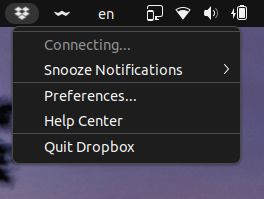
 3 years ago
Hey folks,
I found an extension that solves this issue for me. It worked immediately as soon as I installed the extension. No reboot or logout was required.
I just have to point out I am using Ubuntu 22.04.
https://extensions.gnome.org/extension/615/appindicator-support/
I was and still also using this extension to display old tray icons. Maybe it is also important.
https://extensions.gnome.org/extension/2890/tray-icons-reloaded/
Now I am happy again, here is the proof to make you happy too.
Mod note:
Please note that Dropbox is only supported on vanilla builds of Ubuntu 14.04 or later, or Fedora 21 or later.
We don't officially support forks or variants of these operating systems, or other flavors of Linux at this time.
You can learn more about our supported distros for Linux here.

le_avion
3 years agoCollaborator | Level 8
First of all I am not your dude. You don't know me, you are not my friend, you didn't earn the right to call me dude.
Second, calling people having a problem with Dropbox lazy is impolite and arrogant, so learn some manners.
Third, the way you install Dropbox is convoluted and is not the standard way to install packages on Ubuntu or POP OS. You use deb or snap for Ubuntu and deb or flatpak in POP OS. Most users are not admins and don't want to be admins. They want the ability to install packages via the OS package manager.
Voce entende?
leoheck
3 years agoHelpful | Level 6
Well, if you don't have admin rights, then you should try to get help with your Admin.
Extra info for other users...
After a couple of reboots, Dropbox presented me with a window saying to finish the installation. Then, at this time, the checkbox to start Dropbox with the computer was checked and working.
About Create, Upload, and Share
Find help to solve issues with creating, uploading, and sharing files and folders with Dropbox.
The Dropbox Community team is active from Monday to Friday. We try to respond to you as soon as we can, usually within 2 hours.
If you need more help you can view your support options (expected response time for an email or ticket is 24 hours), or contact us on X, Facebook or Instagram.
For more info on available support options for your Dropbox plan, see this article.
If you found the answer to your question in this Community thread, please 'like' the post to say thanks and to let us know it was useful!


