Our Community is in read-only mode until April 8th, learn more here. You can still search existing threads or get help via Dropbox Support, the Dropbox Help Center, or Learn.
Forum Discussion

leoheck
3 years agoHelpful | Level 6
[Solved, Ubuntu 22.04] Dropbox is always "Connecting..."
Hi, Dropbox tray icon says it is "Connecting..." forever. I cannot see the list of the latest modified files as it used to show or use the tray, actually. I am using Linux Ubuntu 22.04 ...
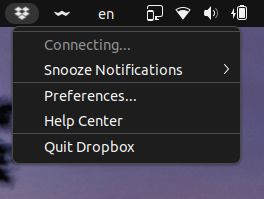
 3 years ago
Hey folks,
I found an extension that solves this issue for me. It worked immediately as soon as I installed the extension. No reboot or logout was required.
I just have to point out I am using Ubuntu 22.04.
https://extensions.gnome.org/extension/615/appindicator-support/
I was and still also using this extension to display old tray icons. Maybe it is also important.
https://extensions.gnome.org/extension/2890/tray-icons-reloaded/
Now I am happy again, here is the proof to make you happy too.
Mod note:
Please note that Dropbox is only supported on vanilla builds of Ubuntu 14.04 or later, or Fedora 21 or later.
We don't officially support forks or variants of these operating systems, or other flavors of Linux at this time.
You can learn more about our supported distros for Linux here.
leoheck
3 years agoHelpful | Level 6
Hey Здравко I did not post the status command because it is ok, working.
Actually, I had an issue where 3 old folders were not syncing. And the status was indicating "Downloading 13 files..." forever.
And the folders were appearing with this sync icon. This was happening for a long time ago, let's say, more than a year. Or at least this is when I started to note it. The related files inside these problematic folders were mostly ".png" images, probably exported from an old app on an old OS during my Ms.C. Other files in the same folder (mostly .csv and .pdf) were Ok. Also, the filenames were not using any kind of non-utf8 format.
Well, I managed to solve this somehow, by removing these folders, deleting the Dropbox app, and adding them back, on the last day. So, the "dropbox status" is "Up to date" now.
I am a dropbox user for a long time, and I haven't seen any improvement for Linux. This tray icon is the worst thing I saw, including the old blurry icon. In the beginning, (many years ago) it was good and also useful. Today, it is always stuck at "Connecting..." and it definitely looks abandoned.
Also, installing dropbox on Linux/Gnome is really complicated since there are many non-nofficial ways of doing it and all of them are not good or outdated.
Also, on Gnome, I am using this extension allowing dropbox to be visible in the top menu.
https://extensions.gnome.org/extension/2890/tray-icons-reloaded/
This is an example of how outdated this tray icon is.
Also, I am not even mentioning that there are still some deprecated issues with the dropbox script... Most of the time I see dropbox complaining about something.
The last one is this isSet, that is is_set now. It happens in line 614.

brightball
3 years agoExplorer | Level 4
For anyone experiencing this on PopOS, I was experiencing the same frustration here so I decided to attempt the headless install, which gave me the following message.
Unable to monitor entire Dropbox folder hierarchy. Please run "echo fs.inotify.max_user_watches=100000 | sudo tee -a /etc/sysctl.conf; sudo sysctl -p" and restart Dropbox to fix the problem.
You can actually increase it to much higher than 100,000 so I bumped it to 524,288 which VS Code also recommends.
I'm still sitting in "Connecting..." as well, but the headless approach may expose some errors that you weren't seeing before. It's currently running hard and according to `iotop` doing a good bit of work, so we'll see what happens after it runs for a while.
- leoheck3 years agoHelpful | Level 6
What was reported in the last reply has nothing to do with this thread. This thing issue has nothing to do with VS or any text editor. This issue has nothing to do with how many files you are being monitored. PLEASE, do not hijack this thread. PLEASE, read the whole thread before posting anything useless. Also, this thread is related to UBUNTU OS. However, if the fix helps people in Pop-OS, then it would be important to know, otherwise DO NOT HIJACK THE THREAD. PLEASE.
 alanpmuscat3 years agoHelpful | Level 6
ATTENTION: STILL NOT SOLVED !!!!!!!!!!!!!!!!!!!!!!!!!!!!!!!!!!!!!!!!!!!!!
- le_avion3 years agoCollaborator | Level 8
They don't care.
Once my subscription is up for renewal I will say goodbye to Dropbox and move to a service that supports Linux fully.
As is I started moving my stuff out because they don't support keeping files on-line only on Linux and my laptop was running out of space because of this.
About Create, Upload, and Share
Find help to solve issues with creating, uploading, and sharing files and folders with Dropbox.
The Dropbox Community team is active from Monday to Friday. We try to respond to you as soon as we can, usually within 2 hours.
If you need more help you can view your support options (expected response time for an email or ticket is 24 hours), or contact us on X, Facebook or Instagram.
For more info on available support options for your Dropbox plan, see this article.
If you found the answer to your question in this Community thread, please 'like' the post to say thanks and to let us know it was useful!


