Need to see if your shared folder is taking up space on your dropbox 👨💻? Find out how to check here.
Forum Discussion

Marc von Amsberg
9 months agoExplorer | Level 3
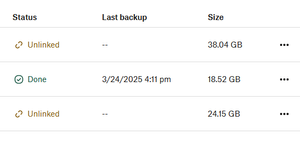
The status of my backup is "unlinked" - how to relink?
During my backup, my device became "unlinked" but still seems to have backed up. Here is a screenshot. I don't see any options in the 3 dots other than download or delete. How to "relink"?

Marc von Amsberg
9 months agoExplorer | Level 3
Thanks, Hannah , you're right that is my backups page
What do you see when you go to the backups tab in the app's preferences on that computer?

Walter Dropbox Community Moderator
9 months agoDropbox Community ModeratorAnd is this the device you were referring to earlier or another one Marc von Amsberg?
About Create, upload, and share
Find help to solve issues with creating, uploading, and sharing files and folders in Dropbox. Get support and advice from the Dropbox Community.
The Dropbox Community team is active from Monday to Friday. We try to respond to you as soon as we can, usually within 2 hours.
If you need more help you can view your support options (expected response time for an email or ticket is 24 hours), or contact us on X, Facebook or Instagram.
For more info on available support options for your Dropbox plan, see this article.
If you found the answer to your question in this Community thread, please 'like' the post to say thanks and to let us know it was useful!


