Our Community is in read-only mode until April 8th, learn more here. You can still search existing threads or get help via Dropbox Support, the Dropbox Help Center, or Learn.
Forum Discussion

REL_IT
2 years agoExplorer | Level 3
View Only link is not loading folders from an app and the browser freezes
Hi Community,
Iam a Dropbox Plus user and I have shared one of my app's folder using the view only link option which allows anyone who has the link to view the same. But the generated view on...

Hannah Dropbox Community Moderator
2 years agoDropbox Community ModeratorHey REL_IT, thanks for joining the Dropbox Community!
Can you let us know more about this app? Is it an API app that you created?
Do the folders/files appear correctly when you're viewing them from your All files page?
Keep me posted.
 REL_IT2 years agoExplorer | Level 3
Sorry for the confusion , its not APP I meant one of the shared folder in the dropbox. When i tried to share that via the view only link Iam facing the above mentioned issue.
- Hannah2 years ago
Thanks for the clarification, REL_IT.
If you delete the link and create a new one, do you see the same thing?
Also, is it possible to send us a screenshot of how the actual folder appears in the All files page (if it doesn't contain any personal info)?
- REL_IT2 years agoExplorer | Level 3
Yes I have deleted and re-created , it didnt solve the issue. And i have checked these folders in dropbox online app and desktop app which are normal and as expected. It is the view only that are causing issue.
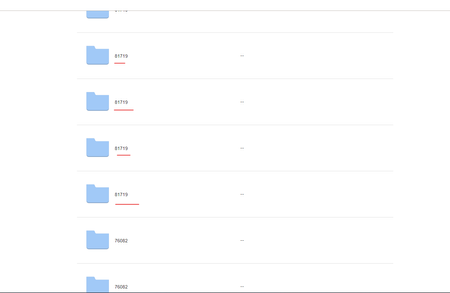
In All files i can see a folder eg A. But in view only i see multiple A. Also the loader is showing for more time and freezes the browser.
About Create, Upload, and Share
Find help to solve issues with creating, uploading, and sharing files and folders with Dropbox.
The Dropbox Community team is active from Monday to Friday. We try to respond to you as soon as we can, usually within 2 hours.
If you need more help you can view your support options (expected response time for an email or ticket is 24 hours), or contact us on X, Facebook or Instagram.
For more info on available support options for your Dropbox plan, see this article.
If you found the answer to your question in this Community thread, please 'like' the post to say thanks and to let us know it was useful!


