Your workflow is unique 👨💻 - tell us how you use Dropbox here.
Forum Discussion

petermooreworld
6 months agoCollaborator | Level 9
Where can I locate the File Request option when visiting my account online?
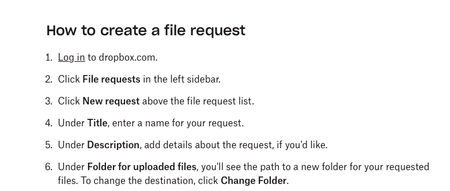
I'm looking to share a folder with clients so they have a folder to upload files for me. I'm constantly using "Share Folder" as that's what it feels like I'm doing, but instead I should do File Requ...
- 6 months ago
Hi there, petermooreworld let's see what we can find together about this!
I think I know what the culprit here is. When accessing your home page online, and specifically on the left sidebar; you should be able to see the following tabs: "Home", "Folders", "Activity" and "More".
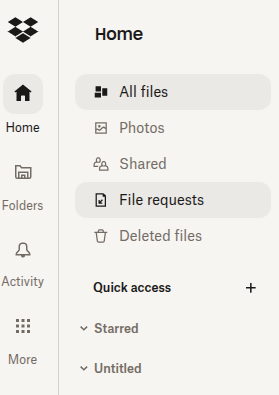
Based on your screenshot it looks like you've clicked on your "Folders" tab, hence why the option isn't there. The option to create a new file request should be visible to you when you click on your "Home" tab. Can you give this a go?
In regards to your latest question, I'll be happy to explain more. When choosing to create a file you can choose between different options.
You can create a new Paper document, a Microsoft Word document, a presentation, a Microsoft Excel file etc. You can also create a new folder.
When clicking on "Create Folder" you immediately create one, while skipping the rest of the options.
Keep in mind that the content you create isn't shared with others, unless you choose to add a member to be part of them. If you don't want to you don't have to, and you can then keep them for your eyes only inside your Dropbox account.
If you have any additional questions, I'll be at your service.


petermooreworld
6 months agoCollaborator | Level 9
Megan
Thank you for the quick reply, and yes, I was on the Folders page instead of the Home Page. Silly me for being on the Folders page when wanting to share a Folder.
Also, I should say once I got there I was looking for something that said "New Request" or "Create New File Request" -- it took me awhile to discover I wanted to "Request file" -- that's not the language I would use.
- Megan6 months ago
Dropbox Community Moderator
Hey petermooreworld!
Happy to see that your issue is now resolved!
Give us a shout if you have any additional questions, or thoughts. 😇
About Create, Upload, and Share
Find help to solve issues with creating, uploading, and sharing files and folders with Dropbox.
The Dropbox Community team is active from Monday to Friday. We try to respond to you as soon as we can, usually within 2 hours.
If you need more help you can view your support options (expected response time for an email or ticket is 24 hours), or contact us on X, Facebook or Instagram.
For more info on available support options for your Dropbox plan, see this article.
If you found the answer to your question in this Community thread, please 'like' the post to say thanks and to let us know it was useful!


