Your workflow is unique 👨💻 - tell us how you use Dropbox here.
Forum Discussion

RayhanHosain
3 years agoExplorer | Level 4
Dropbox says I am running out of space, however I deleted everything and the issue remains
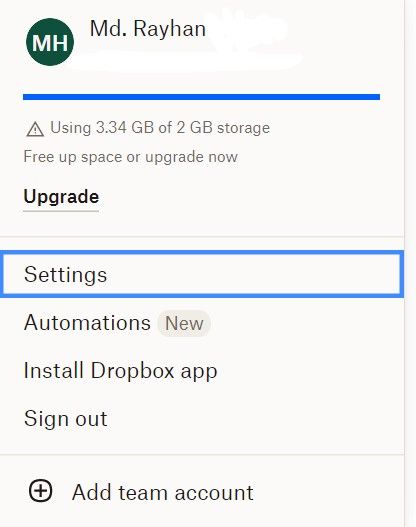
I am a free user. According to dropbox, I have used more than 2 gb. But I have moved all the files on dropbox to another folder and i could see that the total size of the files is only 132 mb. And al...
- 3 years ago
Sorry to jump in here, RayhanHosain!
Do you perhaps have any computers backed up to Dropbox? You can check your backups tab to find out.
Can you please send us a screenshot of what you see on this page?


Rich Super User II
3 years agoSuper User II
RayhanHosain wrote:
According to dropbox, I have used more than 2 gb. But I have moved all the files on dropbox to another folder and i could see that the total size of the files is only 132 mb.
You're either a member of one or more shared folders which also take up space in your account, of you've activated the backup feature which backs up the key folders on your computer.
If you sign in to your account on the Dropbox website and view your Plan page, you'll see your actual usage. You can also see all of the files in your account from the Files page.

RayhanHosain
3 years agoExplorer | Level 4
nothing is shared file on my dropbox....according to this, I have over 3 gb of standard files. But there is nothing on my dropbox.
- Mark3 years ago
RayhanHosain it seems to be a common issue at the moment. I raised it over a month ago with support but the reply was that a response may take some time 😞
- Megan3 years ago
Dropbox Community Moderator
Hey there, RayhanHosain, happy to help!
Is your sharing tab empty as well? Can you check and let me know?
Thanks a bunch!
- RayhanHosain3 years agoExplorer | Level 4
@Megan Yes, it is also empty, i think
- Hannah3 years ago
Sorry to jump in here, RayhanHosain!
Do you perhaps have any computers backed up to Dropbox? You can check your backups tab to find out.
Can you please send us a screenshot of what you see on this page?


About Storage Space
Looking for help with managing the storage space in your Dropbox account? Talk to the Dropbox Community and get advice from members.
The Dropbox Community team is active from Monday to Friday. We try to respond to you as soon as we can, usually within 2 hours.
If you need more help you can view your support options (expected response time for an email or ticket is 24 hours), or contact us on X, Facebook or Instagram.
For more info on available support options for your Dropbox plan, see this article.
If you found the answer to your question in this Community thread, please 'like' the post to say thanks and to let us know it was useful!


