Your workflow is unique 👨💻 - tell us how you use Dropbox here.
Forum Discussion

rwright
1 year agoExplorer | Level 4
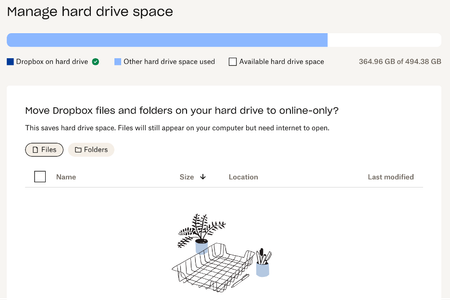
I need some clarifications on the "manage hard drive space" section of the Dropbox preferences.
What does the above mean in the "manage hard drive space" section of my account? According to the way I sync my account everything is supposed to be stored online only, even though I constantly have ...

rwright
1 year agoExplorer | Level 4
sorry, I'm using 1.9 of the 2 T.

Megan Dropbox Community Moderator
1 year agoDropbox Community ModeratorThank you so much for all the info regarding your local and Dropbox space rwright!
You mentioned that you're already using our online-only feature.
If you access your Dropbox folder, does the folder/file icons show the relevant online-only icons? If you have a screenshot of the content inside your Dropbox folder, feel free to attach it here.
- rwright1 year agoExplorer | Level 4
yes, all files have the following
- Walter1 year ago
Hey rwright - sorry to repeat myself here, but did you try deleting the cache folder to see if the space is freed up then?
- rwright1 year agoExplorer | Level 4
no, because the following instructions don't produce the folder identified
- Open your Dropbox folder in Finder.
- Press Shift-Command-. (period).
- A folder named “.dropbox.cache” will appear.
- Open the “.dropbox.cache” folder.
- Delete the files in your cache by dragging them into your Trash.

About Storage Space
Looking for help with managing the storage space in your Dropbox account? Talk to the Dropbox Community and get advice from members.
The Dropbox Community team is active from Monday to Friday. We try to respond to you as soon as we can, usually within 2 hours.
If you need more help you can view your support options (expected response time for an email or ticket is 24 hours), or contact us on X, Facebook or Instagram.
For more info on available support options for your Dropbox plan, see this article.
If you found the answer to your question in this Community thread, please 'like' the post to say thanks and to let us know it was useful!


