Your workflow is unique 👨💻 - tell us how you use Dropbox here.
Forum Discussion

rwright
1 year agoExplorer | Level 4
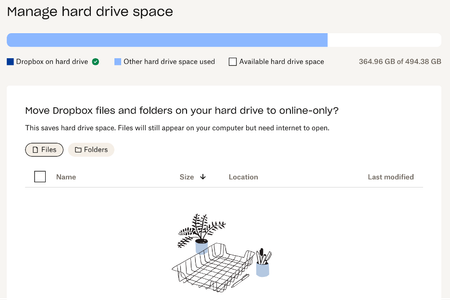
I need some clarifications on the "manage hard drive space" section of the Dropbox preferences.
What does the above mean in the "manage hard drive space" section of my account? According to the way I sync my account everything is supposed to be stored online only, even though I constantly have ...

rwright
1 year agoExplorer | Level 4
yes, all files have the following

Walter Dropbox Community Moderator
1 year agoDropbox Community ModeratorHey rwright - sorry to repeat myself here, but did you try deleting the cache folder to see if the space is freed up then?
- rwright1 year agoExplorer | Level 4
no, because the following instructions don't produce the folder identified
- Open your Dropbox folder in Finder.
- Press Shift-Command-. (period).
- A folder named “.dropbox.cache” will appear.
- Open the “.dropbox.cache” folder.
- Delete the files in your cache by dragging them into your Trash.
- Walter1 year ago
Thanks for that clarification rwright
Could you also check the app's preferences and let me know the location of your Dropbox folder as per the Sync tab?
- rwright1 year agoExplorer | Level 4
/Users/.../Library/CloudStorage/Dropbox
- Walter1 year ago
Thanks for that piece of information too rwright
Can you also ensure that the 'online only files on Mac' setting is toggled on in your account's settings and send us a screenshot of the properties of the Dropbox folder and one of the properties of an online-only folder of yours to check their sizes?
- rwright1 year agoExplorer | Level 4
The .dropbox you asked about yesterday is named
- rwright1 year agoExplorer | Level 4
- rwright1 year agoExplorer | Level 4
that specific title states
- rwright1 year agoExplorer | Level 4
not sure how long it's supposed to take to go into effect
- Megan1 year ago
Hey rwright, the setting takes a little time to update in the backend, so please wait for about 5 minutes, then restart the Dropbox app as follows:
Click the Dropbox menu in the system tray or menu bar of your computer.
Click your profile picture or initials.
Click Quit Dropbox.
Start the Dropbox app from the Applications folder or using Spotlight: Press Command + Space bar keys, then type "dropbox" in the Spotlight search, and hit return.
The Desktop app will then re-sync the files with the logical size set to zero byte. This may take some time to complete depending on how many files you have in your Dropbox. - rwright1 year agoExplorer | Level 4
I turn the switch on yesterday, did what you said about quitting and it still says the same thing.
- rwright1 year agoExplorer | Level 4
sure
- Hannah1 year ago
Hey rwright, before we send you an email, let's check something else.
The screenshot you've sent from the Dropbox app that shows your hard drive space used, indicates that the hard drive is taken up by other files not in Dropbox.
If it were Dropbox files, the color of the bar would be the darker blue shade that you can see for "Dropbox on the hard drive".
"Other hard drive space used" indicates that these are different files outside of Dropbox.
You can check which files take up the most space on your hard drive by following the steps below.
1. Click the Apple menu icon.
2. Click About This Mac.
3. Click Storage.
4. Click Manage….Can you send me a screenshot of what you see there, please?
- rwright1 year agoExplorer | Level 4
If your statement were true then my storage would match and as you see it doesn't. previous support messages in this tread or on your website stated something like, "Other hard drive space used" is a term used in the Dropbox community to refer to storage space. Dropbox calculates file size based on logical size, not physical size. To see which files are using the most storage space, users can adjust their Dropbox settings to set the logical and physical sizes of online-only files to zero." Which I did a while back and was told the "Other hard drive space used" would then go away, which it hasn't.
- rwright1 year agoExplorer | Level 4
I figured out the problem since no one with Dropbox would make the correct suggestion. As mentioned, Apple told me to remove the Dropbox app because it was messing with the storage on my IMac. Once I removed the app, everything on my computer went back to normal, however, I didn't come to this realization for 5 months.
The same problem was beginning to happen on my Macbook Pro. After reaching out to Dropbox, and multiple messages, screen shots sent, NOTHING was resolved. I just kept being asked for the same information by different agents.
As a training tool, the [removed per Community Guidelines] is what the "other hard drive space" should look like if it is representing the proper relationship to the computer. All it took was removing the app and relink my account! And while the "storage" represented in the app isn't an exact match to the storage indicated for the computer, it's closer than the issues I'm having with the laptop, which are 200GB off!
The irony is I moved all my files to Dropbox because I was having similar storage issues with iCloud. The reality is it wasn't dropbox I liked it was Box, because I didn't have any issues with storage and I could see folder details at my account. Box doesn't have practical individual user account options. Now I have to move everything someplace again at some point.


About Storage Space
Looking for help with managing the storage space in your Dropbox account? Talk to the Dropbox Community and get advice from members.
The Dropbox Community team is active from Monday to Friday. We try to respond to you as soon as we can, usually within 2 hours.
If you need more help you can view your support options (expected response time for an email or ticket is 24 hours), or contact us on X, Facebook or Instagram.
For more info on available support options for your Dropbox plan, see this article.
If you found the answer to your question in this Community thread, please 'like' the post to say thanks and to let us know it was useful!


