We're making some changes to the Dropbox Community 👩💻 - Find out more here.
Forum Discussion

dave99
3 years agoHelpful | Level 6
Space usage is wrong
Hi all,
Any and all help appreciated guys - I've got 109GB of storage of which a 100GB 12 month freebie is about to end. I've had a clear out and on my pc the total file size is now 365MB but d...
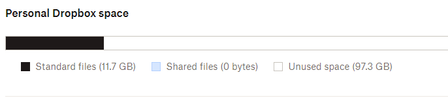
 3 years ago
Finally resolved - there was a hidden folder I couldn't access without the direct address for it's location. Contents deleted and now my account is reporting the correct usage.
Thanks everyone here, Jay, Joni and the Dropbox engineers for helping to resolve this.
dave99
3 years agoHelpful | Level 6
Thanks for the reply Rich, I did have a backup set but I deleted that as part of the clear out, could it still be active or does deleting the backup disable it? If not I can't find a setting to disable the backups


About Storage Space
Looking for help with managing the storage space in your Dropbox account? Talk to the Dropbox Community and get advice from members.
The Dropbox Community team is active from Monday to Friday. We try to respond to you as soon as we can, usually within 2 hours.
If you need more help you can view your support options (expected response time for an email or ticket is 24 hours), or contact us on X, Facebook or Instagram.
For more info on available support options for your Dropbox plan, see this article.
If you found the answer to your question in this Community thread, please 'like' the post to say thanks and to let us know it was useful!


