Our Community is in read-only mode until April 8th, learn more here. You can still search existing threads or get help via Dropbox Support, the Dropbox Help Center, or Learn.
Forum Discussion

huffie
1 year agoExplorer | Level 3
Space used discrepancy after calculating the size of my files and folders
Hi all, based on my directories calculated size, it shouldn't exceed more than 31TB
The usage under the name reported otherwise
There were also no backups usage
[Up...

Hannah Dropbox Community Moderator
1 year agoDropbox Community ModeratorWelcome to our Community, huffie.
Would you mind sending us a screenshot of your space usage as shown in your plan page as well?
Thanks in advance.

huffie
1 year agoExplorer | Level 3
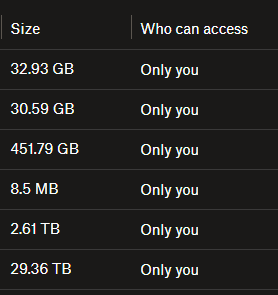
Space usage as follow:
Thanks
- Hannah1 year ago
- huffie1 year agoExplorer | Level 3
@Hannah , kindly find the attached Team usage as requested for your reference
- Hannah1 year ago
Thanks, huffie.
Can you please check one more thing?
Do you have any shared folders that you don't need here?
This page should show you shared folders that you never added to your account, or that you deleted.
If you remove the ones you don't need (if any), do you see a difference in your used space?
About Storage Space
Looking for help with managing the storage space in your Dropbox account? Talk to the Dropbox Community and get advice from members.
The Dropbox Community team is active from Monday to Friday. We try to respond to you as soon as we can, usually within 2 hours.
If you need more help you can view your support options (expected response time for an email or ticket is 24 hours), or contact us on X, Facebook or Instagram.
For more info on available support options for your Dropbox plan, see this article.
If you found the answer to your question in this Community thread, please 'like' the post to say thanks and to let us know it was useful!


