Your workflow is unique 👨💻 - tell us how you use Dropbox here.
Forum Discussion

MtnBiker
3 years agoExplorer | Level 4
Storage space error (Sort of solved)
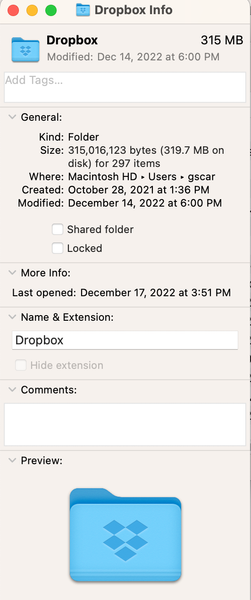
Dropbox keeps telling me I've exceeded my 2GB account. 1) I'm supposed to have 12.25GB, 2) I only show 320MB on my computers, 3) On the web I can't see sizes. 4) No customer service How is thi...


Jay Dropbox Community Moderator
3 years agoDropbox Community ModeratorHi MtnBiker, thanks for bringing this to our attention.
If your machine is showing less data than the site, then you could be using selective sync to prevent entire folders from syncing, or your files are online-only.
According to your quota page, what is the exact amount you're using? A screenshot would be helpful.
Do you have any ongoing computer or external drive backups?
This will help me to assist further!

MtnBiker
3 years agoExplorer | Level 4
PS. My laptops are on Ventura 13.1. Wife's is Catalina. iPhone is up to date.
- Hannah3 years ago
Thanks for the additional info and screenshots, MtnBiker.
Have you checked your backups page, to see if you have any backups enabled that might be taking up your space, like Jay suggested?
- MtnBiker3 years agoExplorer | Level 4
Hannah Thank you for supplying the link. Don't know about backups in this context and don't know what this means. The Seagate is one of my TimeMachine backup drives
- Walter3 years ago
Hey MtnBiker, sorry to jump in, but I wanted to mention that it seems that you somehow backed up your Seagate drive to Dropbox and it's counting towards your account's quota.
If you delete it from this page, your storage space should be freed up.
Let us know of any updates!

About Storage Space
Looking for help with managing the storage space in your Dropbox account? Talk to the Dropbox Community and get advice from members.
The Dropbox Community team is active from Monday to Friday. We try to respond to you as soon as we can, usually within 2 hours.
If you need more help you can view your support options (expected response time for an email or ticket is 24 hours), or contact us on X, Facebook or Instagram.
For more info on available support options for your Dropbox plan, see this article.
If you found the answer to your question in this Community thread, please 'like' the post to say thanks and to let us know it was useful!


