Our Community is in read-only mode until April 8th, learn more here. You can still search existing threads or get help via Dropbox Support, the Dropbox Help Center, or Learn.
Forum Discussion

EnAr
2 years agoExplorer | Level 4
Can't backup a folder because it's not in default location (it is, I think)
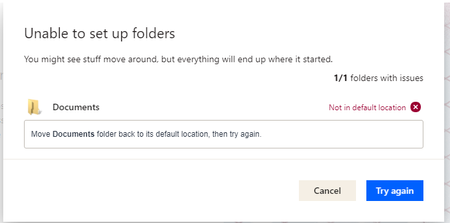
I had used Dropbox before, worked great. I had to reinstall it to today because of reasons. When I wanted to set it up again, I checked to backup the Documents folder but got the message below. Also,...

Rich Super User II
2 years agoSuper User II
EnAr wrote:
Can't backup a folder because it's not in default location
What is the exact path of your Documents folder? The default location on a Windows system would be C:\Users\[your username]\Documents. If that's not where the folder is located, you'll need to move it back before Dropbox can back it up (which actually just moves it to the local Dropbox folder so it can sync).
Go into Properties for your Documents folder and check the Location tab.

EnAr
2 years agoExplorer | Level 4
So my Documents folder was in here actually: C:\Users\Ento\Dropbox (Old)\PC\Documents
The reset to default location button didn't work, so I followed this guide
Now, MY DOCUMENTS FOLDER IS EMPTY! Where are my files??? I have really important documents in my documents folder.
It's still kind of fine because my important files that I was syncing are in my Dropbox, I have a Dropbox's "Documents" folder, however it is not a proper replacement. While my most important files that I was syncing are in that folder, I can't find the other files from the original Documents folder that I wasn't syncing.
About Apps and Installations
Have a question about a Dropbox app or installation? Reach out to the Dropbox Community and get solutions, help, and advice from members.
The Dropbox Community team is active from Monday to Friday. We try to respond to you as soon as we can, usually within 2 hours.
If you need more help you can view your support options (expected response time for an email or ticket is 24 hours), or contact us on X, Facebook or Instagram.
For more info on available support options for your Dropbox plan, see this article.
If you found the answer to your question in this Community thread, please 'like' the post to say thanks and to let us know it was useful!


