Our Community is in read-only mode until April 8th, learn more here. You can still search existing threads or get help via Dropbox Support, the Dropbox Help Center, or Learn.
Forum Discussion

EnAr
2 years agoExplorer | Level 4
Can't backup a folder because it's not in default location (it is, I think)
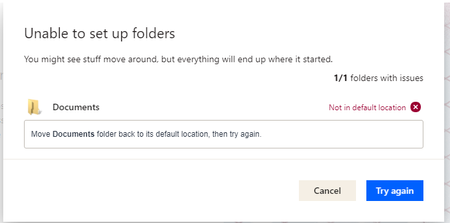
I had used Dropbox before, worked great. I had to reinstall it to today because of reasons. When I wanted to set it up again, I checked to backup the Documents folder but got the message below. Also,...

hejlightyear
1 year agoNew member | Level 1
I have the same issue.. My laptop is Macbook Pro M3 Max. Can you let me know if you found a solution to this? Thank you very much
- Hannah1 year ago
Dropbox Community Moderator
Sorry to see that you're having this issue, hejlightyear.
Can you let us know where your Dropbox folder is currently located?
What's the exact error message that you're getting? Can you send us a screenshot?
Thanks.
- hejlightyear1 year agoNew member | Level 1
Thank you, Hannah! Here's the screenshot.
- Jay1 year ago
Hi hejlightyear, thanks for the image. In order to look into this matter in more detail, I'd recommend contacting the support team directly for them to investigate further.
 EnAr1 year agoExplorer | Level 4
Hello.
Unfortunately as this was 2 years ago and I stopped using Dropbox, I don't remember the details.
I think that, for some reason, probably for being previously a user of many other drives (i think the main cause of the issue was onedrive, but possibly the mega app too), I had different "Documents" folders. One in the Documents location, and one or two in other locations.
I don't remember how I fixed the issue. First, I probably reinstalled the dropbox app (try both before and after these steps). But, it was probably one of these two:
- Instead of backing up the Documents folder, i left it unchecked, and manually set the folders I wanted to back up to back up (go to file explorer, right click, youll find there, at least in windows).
- Playing around with the Documents folders I had. Renaming some, replacing, deleting, until only one remained in the default docs location, but I DON'T think this is what I did. If remember correctly, all the months I was using Dropbox, I was syncing from the randomly located "Documents folder."
- I jist remembered this one, I think this couldve been it, along with the reinstalling: Deleting OneDrive and Mega completely from my system, not just disabling them. I think Onedrive caused a lot of issues.
I don't use Mac, never did. Perhaps the issue for you is iCloud (instead of OneDrive), or another default way the system is backing up files. Good luck.


About Apps and Installations
Have a question about a Dropbox app or installation? Reach out to the Dropbox Community and get solutions, help, and advice from members.
The Dropbox Community team is active from Monday to Friday. We try to respond to you as soon as we can, usually within 2 hours.
If you need more help you can view your support options (expected response time for an email or ticket is 24 hours), or contact us on X, Facebook or Instagram.
For more info on available support options for your Dropbox plan, see this article.
If you found the answer to your question in this Community thread, please 'like' the post to say thanks and to let us know it was useful!


