Our Community is in read-only mode until April 8th, learn more here. You can still search existing threads or get help via Dropbox Support, the Dropbox Help Center, or Learn.
Forum Discussion

EnAr
2 years agoExplorer | Level 4
Can't backup a folder because it's not in default location (it is, I think)
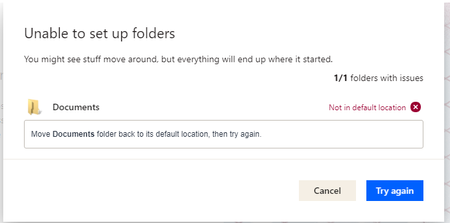
I had used Dropbox before, worked great. I had to reinstall it to today because of reasons. When I wanted to set it up again, I checked to backup the Documents folder but got the message below. Also,...

Hannah Dropbox Community Moderator
1 year agoDropbox Community ModeratorSorry to see that you're having this issue, hejlightyear.
Can you let us know where your Dropbox folder is currently located?
What's the exact error message that you're getting? Can you send us a screenshot?
Thanks.

hejlightyear
1 year agoNew member | Level 1
Thank you, Hannah! Here's the screenshot.
- Jay1 year ago
Hi hejlightyear, thanks for the image. In order to look into this matter in more detail, I'd recommend contacting the support team directly for them to investigate further.

About Apps and Installations
Have a question about a Dropbox app or installation? Reach out to the Dropbox Community and get solutions, help, and advice from members.
The Dropbox Community team is active from Monday to Friday. We try to respond to you as soon as we can, usually within 2 hours.
If you need more help you can view your support options (expected response time for an email or ticket is 24 hours), or contact us on X, Facebook or Instagram.
For more info on available support options for your Dropbox plan, see this article.
If you found the answer to your question in this Community thread, please 'like' the post to say thanks and to let us know it was useful!


