Our Community is in read-only mode until April 8th, learn more here. You can still search existing threads or get help via Dropbox Support, the Dropbox Help Center, or Learn.
Forum Discussion

James S.95
1 month agoExplorer | Level 4
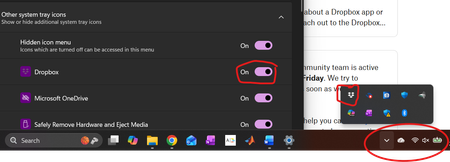
Dropbox icon not showing, although set to show
Application Affected Dropbox Desktop Device Thinkpad E15 Operating System/Browser (if using the web) Windows 11 Dropbox App Version (if using the app) 241.4.4853
Question or Issue I am runn...
- 1 month ago
Hi there James S.95 - sorry to hear you're having issues with this.
Have you tried dragging the Dropbox icon directly to your system tray (shown in your screenshot?
This should help, but please let me know of any updates!


prainbow
1 month agoExplorer | Level 3
I have exactly the same issue — Dropbox icon hid in spite of being set to show — due, apparently, to the most recent recent Windows update. But dragging the icon from the Hidden Icons menu to the Taskbar is prohibited by a circle with a line through it (Windows 11 Home, 25H2). Can I change some other Windows setting to keep the icon in the Taskbar permanently?

James S.95
1 month agoExplorer | Level 4
All of my advice is given in my original posting. Do that first.
- prainbow1 month agoExplorer | Level 3
This worked: Opened Task Manager as Administrator, ended all Dropbox processes, restarted Dropbox.
About Apps and Installations
Have a question about a Dropbox app or installation? Reach out to the Dropbox Community and get solutions, help, and advice from members.
The Dropbox Community team is active from Monday to Friday. We try to respond to you as soon as we can, usually within 2 hours.
If you need more help you can view your support options (expected response time for an email or ticket is 24 hours), or contact us on X, Facebook or Instagram.
For more info on available support options for your Dropbox plan, see this article.
If you found the answer to your question in this Community thread, please 'like' the post to say thanks and to let us know it was useful!


