Our Community is in read-only mode until April 8th, learn more here. You can still search existing threads or get help via Dropbox Support, the Dropbox Help Center, or Learn.
Forum Discussion

Kris J.
7 years agoHelpful | Level 5
Dropbox indicates 'downloading xx files' _forever_
Dear community,
I have a perfectly correct Dropbox installation, no noteworthy issues with illegal filenames and I have performed all possible kinds of troubleshooting.
Even so, every so often, m...
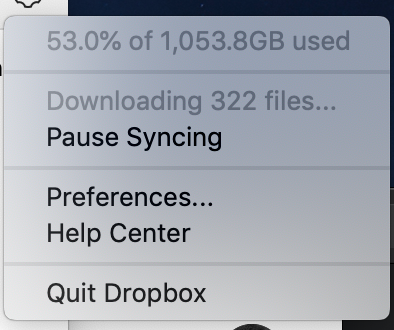
- 7 years agoHi Kris, generally symlinks are an issue for files that seem to endlessly download, especially on Macs since they are created often.Another thing to check out is if you’re running the beta version of the app.To install our latest stable version, visit here and uncheck the box next to "Early releases". Then redownload the app.Incidentally, which version of the Mac OS are you running?Keep me posted with any updates!

Jay Dropbox Community Moderator
7 years agoDropbox Community ModeratorGlad to hear that the syncing problem was resolved by downgrading to the stable version!
Currently, there isn’t an option to see the actively syncing files via the desktop app. The only way would be to see the files in the Dropbox folder with the syncing icons to determine which ones were syncing, though if you have multiple subfolders and locations, this won’t be easy!

Kris J.
7 years agoHelpful | Level 5
Hi Jay,
I understand such functionality might not currently be available although, the fact that 'sync badges' are overlaid on file icons must indicate there is some kind of mechanism which allows sync status to be obtained (I suspect some kind of attribute). That should allow one to programatically obtain an overview of potentially problematic files...
Whatever may be the case, given how frequent reports of 'permanent syncing' or general sync issues are, it would be nice to consider this for a feature update of some sort.
Users (and often customers!) should be empowered to troubleshoot their system in the event of trouble instead of having to resort to the general 'stop dropbox/unlink/reinstall/ ...' scenarios. It would save a lot of time and effort.
- Jay7 years agoI’ve forwarded this as a suggestion for our dev team to see and consider this in future updates to the Dropbox desktop application!
 rrrr17 years agoNew member | Level 2
=X
- Kris J.6 years agoHelpful | Level 5
Any news on this? These issues still occur from time to time and are very annoying...
- sehamel6 years agoNew member | Level 2
I also have this problem, and its very frustrating. I am running Windows 10, Dropbox version 85.4.155, it says downloading 317 files and uploading 44 files... I am connected to the interenet and everything seems fine. Restarting the computer or dropbox doesn't help. There seems to be little rhyme or reason to the files that won't sync. Some are pdfs that haven't been touched in years, in other cases a fold shows as not synched... but all the files inside show as synched (and hidden files are showing). Any help would be appreciated...
About Apps and Installations
Have a question about a Dropbox app or installation? Reach out to the Dropbox Community and get solutions, help, and advice from members.
The Dropbox Community team is active from Monday to Friday. We try to respond to you as soon as we can, usually within 2 hours.
If you need more help you can view your support options (expected response time for an email or ticket is 24 hours), or contact us on X, Facebook or Instagram.
For more info on available support options for your Dropbox plan, see this article.
If you found the answer to your question in this Community thread, please 'like' the post to say thanks and to let us know it was useful!


