Our Community is in read-only mode until April 8th, learn more here. You can still search existing threads or get help via Dropbox Support, the Dropbox Help Center, or Learn.
Forum Discussion

giobertelli
2 years agoExplorer | Level 3
Dropbox on macOS is using too much RAM while just sitting idle
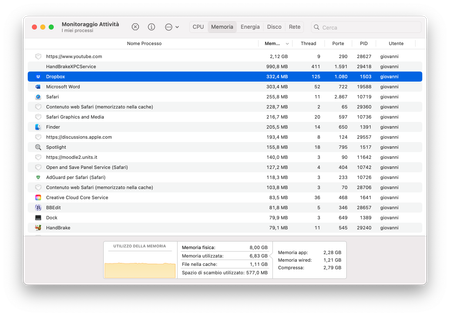
I checked how much RAM I was using at the moment. The only open apps I have are Safari, HandBrake, Bbedit and Word. Neither of those is using any file hosted on dropbox nor is any app upload...

giobertelli
2 years agoExplorer | Level 3
Thanks for the help page, but I had already checked it.
I'm nowhere near that 300000 file amount, also because I'm on a free account.
About the Dropbox folder in ~/Library/CloudStorage:
298.409.100 bytes (298,7 MB on disk), 136 items
Current Dropbox RAM usage: 363,6 MBs... It's currently the highest RAM user on my PC at the moment.

Walter Dropbox Community Moderator
2 years agoDropbox Community ModeratorHey giobertelli - sorry to jump in here, but did you reboot your computer since you first noticed this?
- giobertelli2 years agoExplorer | Level 3Hello, I’ve rebooted the Mac and it still using more than 300MBs of RAM
- Nancy2 years ago
Hi from me as well, giobertelli! Out of curiosity, did you see an increased CPU usage by Dropbox, after your desktop app was updated to Dropbox for macOS on File Provider (when your local Dropbox folder was moved under ~/Library/CloudStorage basically)?
Can you also clarify what’s the current syncing status of your Dropbox app?
- giobertelli2 years agoExplorer | Level 3
Hello, no I've not noticed any CPU usage problem. In Activity Monitor it's currently using 0,2% of CPU, with a CPU time of 14,83 (I rebooted around an hour ago). RAM usage is still more than 300 MBs as it was in the last days. Don't know about the files being moved Library/CloudStorage as I've restarted using macOS after a few years on Windows only a month ago, so when I installed Dropbox files were already in Library/CloudStorage AFAIK.
Since I logged in a month ago and I only have a Basic account the files are currently saved on my hard disk space and have been synced a month ago. So the app is supposedly using that much RAM by just sitting idle.
Btw, please reconsider the Basic plan as being a local only service on desktop instead of giving access to files on demand! What's the purpose of having a cloud space if I have to keep files on my hard drive? 😅

About Apps and Installations
Have a question about a Dropbox app or installation? Reach out to the Dropbox Community and get solutions, help, and advice from members.
The Dropbox Community team is active from Monday to Friday. We try to respond to you as soon as we can, usually within 2 hours.
If you need more help you can view your support options (expected response time for an email or ticket is 24 hours), or contact us on X, Facebook or Instagram.
For more info on available support options for your Dropbox plan, see this article.
If you found the answer to your question in this Community thread, please 'like' the post to say thanks and to let us know it was useful!


