Our Community is in read-only mode until April 8th, learn more here. You can still search existing threads or get help via Dropbox Support, the Dropbox Help Center, or Learn.
Forum Discussion

giobertelli
2 years agoExplorer | Level 3
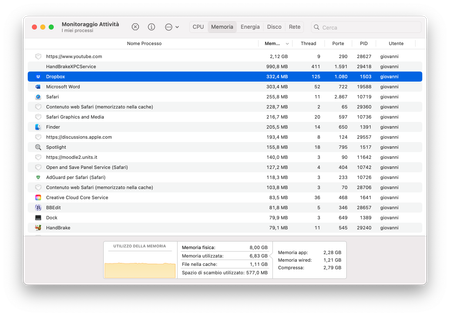
Dropbox on macOS is using too much RAM while just sitting idle
I checked how much RAM I was using at the moment. The only open apps I have are Safari, HandBrake, Bbedit and Word. Neither of those is using any file hosted on dropbox nor is any app upload...

Hannah Dropbox Community Moderator
2 years agoDropbox Community ModeratorWhat's the current sync status of the app, when you hover over the Dropbox icon, giobertelli?
Do you see any difference when all your other apps are closed?

giobertelli
2 years agoExplorer | Level 3
It is simply a Dropbox icon. It is not syncing (or at least it doesn’t say so in the panel), also because the only synced data is around 200MB that I synced last month
- giobertelli2 years agoExplorer | Level 3
Aggiornato in Italian means up to date.
- Megan2 years ago
In this case, can I send you an email in order for us to have a closer look into this giobertelli?
- giobertelli2 years agoExplorer | Level 3
Of course. Can you access my email address or do you need me to write it here?
- Jay2 years ago
Hi giobertelli, I've sent you an email, please could you reply to it when you get a chance.


About Apps and Installations
Have a question about a Dropbox app or installation? Reach out to the Dropbox Community and get solutions, help, and advice from members.
The Dropbox Community team is active from Monday to Friday. We try to respond to you as soon as we can, usually within 2 hours.
If you need more help you can view your support options (expected response time for an email or ticket is 24 hours), or contact us on X, Facebook or Instagram.
For more info on available support options for your Dropbox plan, see this article.
If you found the answer to your question in this Community thread, please 'like' the post to say thanks and to let us know it was useful!


